EECS 183 Python Style Guide
Following consistent code style guidelines…
- … helps other people read and understand your code
- … helps you make fewer mistakes
- … is important when more than one person is working on a project
The code style in this course will be graded against the following guidelines, which are a simplified version of the official PEP 8 style guide used by professional Python developers.
There’s a lot here, but don’t worry; soon, it will all just be normal and easy for you. If a guideline mentions a programming concept we haven’t covered in class yet (for example, the mention of “class names”), then just ignore it for now.
Flake8 Will Help a Lot
Flake8 is one of the extensions we set up when installing VS Code. This extension will be very helpful for notifying you of many (but not all!) style mistakes, so pay attention to the yellow and red squiggles it adds to your code! You can hover over them with your mouse to see what it’s complaining about. For example:
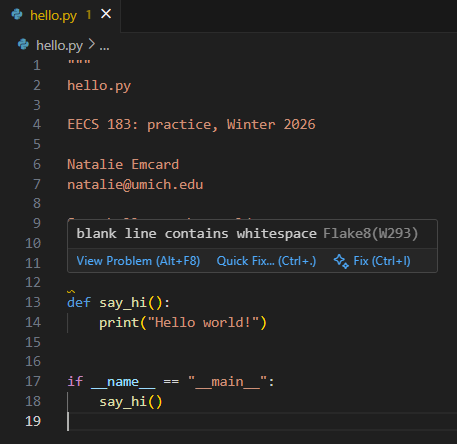
As another example, with this code:
def say_hi() -> None:
    print("Hello world!")
if __name__ == "__main__":
    say_hi()
we get:
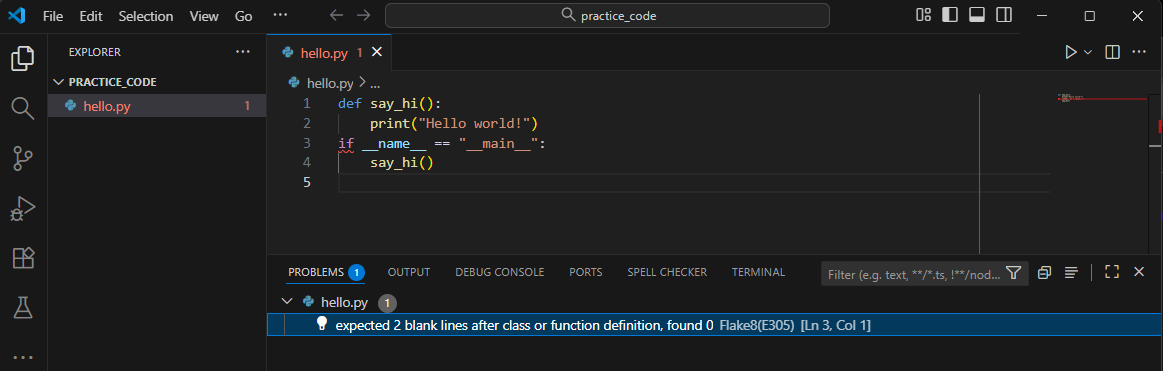
Note in the image above the many indications of a single problem:
- In the
Explorerarea in the upper-left,hello.pyis written in red text and has a red1indicating one problem. - There is a red squiggle at the problem area in the text editor pane. If you hover your mouse pointer over such indications, a pop-up will describe the problem.
- The area on the far right depicts a tiny view of your entire file (which of course contains very little code in this case). But note the red horizontal line indicating a problem, and also the red vertical line in the scroll bar itself.
- If you choose the
Terminalmenu, thenNew Terminal, and then click theProblemstab, you can see a list of problems, as shown at the bottom of the image above. This can be helpful when you have a few problems that you can’t find in a large file. You can click on a listed problem, and it will take your cursor directly to the location of the problem.
It’s important to note that, while Flake8 is a wonderful tool, it will not perfectly capture every issue we’re looking for in this style guide, so be on the lookout. But it will make this work much, much easier.
Managing Line Lengths
We will enforce an 80 character limit per line of code. This includes comments and lines of code. Python is a little picky about how to break up long lines, so we’ll consider this matter of style in more depth than any other.
Flake8 will give helpful warnings about this as well. We’ve also already configured VS Code so that a thin vertical line appears at the 80 character limit in your editor window.
For example:
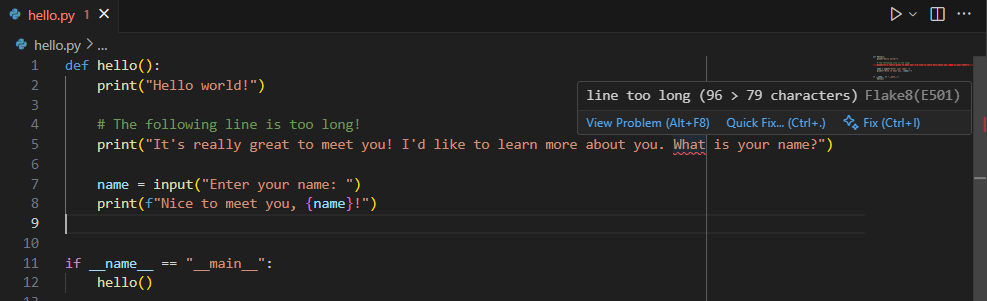
Note above the Flake8 message when hovering over the word “what”, which is right at the limit. Also note the vertical line in the editor window itself, depicting the limit.
How should we fix an issue like this? We’ll consider that next.
Long Expressions
To break up long expressions onto multiple lines, let’s first look at an example:
Bad Style:
def main() -> None:
    ...
    # Long mathematical expression - line is too long
    total_result = first_variable**2 + second_variable**3 - (third_variable / 4) + fourth_variable_from_a_function()
    ...
Good Style:
def main() -> None:
    ...
    # Long mathematical expression - split across lines nicely
    total_result = (
        first_variable**2
        + second_variable**3
        - (third_variable / 4)
        + fourth_variable_from_a_function()
    )
    ...
To put this process into words: If you have a long mathematical or logical expression, first wrap the whole thing in an extra set of parentheses ( ) to clearly mark the start and end of the expression. Then have the first line end with (, and a final line containing ) by itself. The final ) should be lined up vertically with the start of the entire statement (e.g., the first “t” of “total” above). The items that are between the ( ) should be placed one line at a time, indented one extra level. Also note that each new line inside the ( ) starts with an operator (e.g., + or -). The end result is that the overall format of the expression can be seen at a glance.
Here’s another example, this time with a long condition. The same principles apply.
Good Style:
def main() -> None:
    ...
    # Long 'if' statement
    if (
        condition_one
        and (condition_two or condition_three)
        and condition_four
        and not condition_five
    ):
        do_something()
    ...
Consider the example below. At least the lines are broken up! But the operator placement is not according to best style. Each line should begin, not end, with an operator.
Bad Style:
def main() -> None:
    ...
    # Long mathematical expression
    total_result = (
        first_variable**2 +
        second_variable**3 -
        (third_variable / 4) +
        fourth_variable_from_a_function()
    )
Long Print Statements
Consider a print statement with a long string inside. The string can be broken into multiple strings, one per line, within the print parentheses.
The following print is too long and should be broken up.
Bad Style:
print(f"Homework contribution (with free bonus points): {homework_contribution} points")
Below is an example in which that long string is broken up.
Good Style:
    print(
        "Homework contribution (with free bonus points): ",
        f"{homework_contribution} points"
    )
For the good style version immediately above, note:
- The
printoutput will be exactly the same as the originalprint. - There’s one (smaller) string per line, each separated by a comma.
- The first string ends with a space (inside the quotes) since we want a space after the
:. - Only the second string needs to be an f-string, so we intentionally did not make the first string an f-string.
Long Data Structures
Follow a similar pattern for lists, tuples, sets, and dictionaries. For example, here’s a long list split across multiple lines:
Good Style:
    my_long_list = [
        1, 2, 3, 4, 5, 6, 7, 8, 9, 10, 11, 12, 13,
        14, 15, 16, 17, 18, 19, 20, 21, 22, 23, 24,
    ]
For a dictionary, it’s best to have one key: value pair per line:
Good Style:
    my_complex_dict = {
        "key_one": "this is a very, very, very, very long value",
        "key_two": "another long value",
    }
Tip: Adding a trailing comma on the last item (like 24, or “another long value”,) is a common and recommended practice. It makes it cleaner to add new items later and results in cleaner changes in documents from one version to another. This isn’t required, though.
Function Calls & Definitions
For function calls and definitions, break the line after the opening parenthesis, indent the items inside (one per line), and left-align the close parenthesis.
For example, for the my_function function call:
Good Style:
def other() -> None:
    # primer-spec-highlight-start
    my_function(
        parameter_one="this is very long",
        parameter_two=another_variable,
        parameter_three=True,
    )
    # primer-spec-highlight-end
A function with a long parameter list is handled similarly:
Good Style:
# primer-spec-highlight-start
def my_function(
    parameter_one: str,
    parameter_two: int,
    parameter_three: bool,
) -> None:
# primer-spec-highlight-end
    print("hello")
In the rest of this document, we consider other components of good style.
Comments
The Top Comment (The Docstring)
At the top of each file, include a module docstring ("""...""") with your (and your partner’s, if applicable) name, your (and your partner’s, if applicable) uniqname, and a small description of the program or file. This is included in all the starter code.
"""
hello.py

EECS 183: Project 0, Fall 2023

Natalie Emcard
natalie@umich.edu

Says hello to the world.
"""
Space After #
Always put a space after the # symbol
Bad Style:
#The space is missing!
Good Style:
# The space is present.
Comments for Clarity Only
Add a comment when the code would not be clear to you if you were reading it for the first time.
For example, the comment below is not necessary, because the code is quite simple on its own (once you know the basics of Python).
Bad Style:
    # Print out number the user enters
    x = int(input("Enter a number: "))
    print(f"You entered: {x}")
In the next example, the purpose of the code is not immediately obvious, so the comment is very helpful.
Good Style:
    # Find the base 3 logarithm of x
    log3 = 0
    while x > 1:
        x = x // 3
        log3 += 1
Delete comments when they no longer serve their purpose. A classic example is the TO DO type of comments we sometimes leave for you in starter code. In the example below, the TO DO should be deleted once the task is finished.
Bad Style:
    # TO DO your code here
    x = int(input("Enter a number: "))
    print(f"You entered: {x}")
You may also find it useful to occasionally write notes to yourself in code. If they’re temporary notes that no longer serve a purpose, they should be deleted as well. The example below is one such situation.
Bad Style:
    # primer-spec-highlight-start
    # STILL NEED TO WRITE TEST CASES FOR THIS
    # primer-spec-highlight-end
    x = int(input("Enter a number: "))
    print(f"You entered: {x}")
Comments on their Own Lines
Comments must be on their own lines, preceding the code they describe.
Bad Style:
y = 4 # this comment is usually bad style
The code above shows an inline comment. It can be appropriate when used sparingly, but to keep things simple for this course, we’ll ask you to just not use it. Use the style below instead.
Good Style:
    # this comment is good style
    x = 3
Large Commented-Out Regions
You may find it useful at times to write some temporary code to check things while you’re working…
def go_time() -> None:
    # primer-spec-highlight-start
    # Quick test: Check calculate function results for a few examples
    print(calculate(6))
    print(calculate(15))
    # primer-spec-highlight-end

    start_value = int(input("Enter starting value: "))
    print(calculate(start_value))
… and later you might not need it for a while, so you comment it out:
def go_time() -> None:
    # primer-spec-highlight-start
    # Quick test: Check calculate function results for a few examples
    # print(calculate(6))
    # print(calculate(15))
    # primer-spec-highlight-end

    start_value = int(input("Enter starting value: "))
    print(calculate(start_value))
But for the final submission of your code, you should remove all such code entirely:
Good Style:
def go_time() -> None:
    start_value = int(input("Enter starting value: "))
    print(calculate(start_value))
Whitespace and Indentation
Space Around Operators
There must be a single space around operators (=, +=, ==, +, -, *, /, etc.) and after commas.
Bad Style:
    count+=(a+b)*c/d+some_function()
    my_list = [1,2,3]
Good Style:
    count += (a + b) * c / d + some_function()
    my_list = [1, 2, 3]
However, note the exception in making a function call with keyword arguments.
Spaces and Parentheses
There should not be a space immediately inside parentheses.
Bad Style:
pluralize( "person" ,"people" , number_of_people )
There should not be a space between a function name and the parentheses.
Bad Style:
pluralize ("person" ,"people" , number_of_people)
Good Style:
pluralize("person", "people", number_of_people)
Line Break with :
There should be a line break after every colon (:) starting a new block.
Bad Style:
    if x > 3:
        y = 2
Good Style:
if x > 3:
y = 2
End of the line
There should not be any blank spaces at the end of any line. Flake8 will warn you about this.
4-Space Indentation
Indent your code using 4 spaces for each new block. (Note that Python also syntactically requires proper indentation.)
Correct indentation is required for a Python program to even run, but there are a few indentation practices that are only style errors and not syntax errors.
Bad Style:
def main() -> None:
    x = 3

    if x > 0:
        print("x is positive.")
    elif x == 0:
# primer-spec-highlight-start
      print("x is zero.")  # Too little indentation
# primer-spec-highlight-end
    else:
        for i in range(3):
# primer-spec-highlight-start
                print("*") # Too much indentation
# primer-spec-highlight-end
    return 0
Good Style:
def main() -> None:
    x = 3

    if x > 0:
        print("x is positive.")
    elif x == 0:
        print("x is zero.")
    else:
        for i in range(3):
            print("*")
    return 0
Four Spaces vs. Tab
As long as you use VS Code for all your programming, hitting the tab OR hitting space four times should be fine and equivalent, due to the default settings of VS Code.
You should know, though, that in some text editors, the two approaches are represented differently, even if they have the same appearance. And unfortunately, Python will get confused and complain about syntax errors if you have a mix of the two in your program. So stick with programming in VS Code (not editing your code in a different program or text editor) to make sure you don’t run into problems with this.
If you end up with a tabs verses spaces problem in your code, open your file in VS Code, highlight all the text, and choose View, Command Palette… (or press Cmd+Shift+P on Mac / Ctrl+Shift+P on Windows). In the box that appears, type “Convert Indentation to Spaces” and press Enter.This will automatically fix all indentation in your file to use spaces, resolving any mixing errors.
Blank Lines
Use blank lines to separate logical sections of your code and improve readability.
- Use two blank lines before and after a function definition (
def) or a class definition (class). - Use one blank line to separate logical “paragraphs” inside a function.
Bad Style:
def function_one() -> None:
    """
    RME...
    """
    # ... code ...
def function_two() -> None:
    """
    RME...
    """
    # Get user input
    name = input("Enter name: ")
    age = int(input("Enter age: "))
    # Process the input
    print(f"Hello, {name}. You are {age}.")
Good Style:
def function_one() -> None:
    """
    RME...
    """
    # ... code ...
# primer-spec-highlight-start


# primer-spec-highlight-end
def function_two() -> None:
    """
    RME...
    """
    # Get user input
    name = input("Enter name: ")
    age = int(input("Enter age: "))
# primer-spec-highlight-start

# primer-spec-highlight-end
    # Process the input
    print(f"Hello, {name}. You are {age}.")
Blank lines should have no whitespace in them. Problems with this are not always visible to us, but Flake8 will point it out:
Variables and Constants
Descriptive Names
Variables must have names that describe their purpose. i, j, and k used as loop counters are acceptable.
Bad Style:
    var1 = 0
    var2 = 0
Good Style:
    num_students = 0
    num_classes = 0
Naming Conventions
Use standard Python naming conventions:
- Variables and functions must be “snake_case” (all lowercase with underscores separating words).
course_credits = 4def calculate_gpa():
- Constants (variables that never change) must be in “ALL_CAPS”.
MAX_CREDITS = 18
- Class names must be “PascalCase” (first letter of each word capitalized).
class CityBus:- You can ignore this requirement until we talk about classes much later in the semester.
Global Constants Only
Do not use global variables (variables defined outside of any function). It may not seem like a big deal when you’re first learning how to program, but global variables make code harder to understand, debug, and maintain.
Global constants are acceptable and should be at the top of the file. Unlike other programming languages, there’s no way in Python to force a constant to have only one value. That is, it’s possible in Python to assign a constant a different value during program execution. But this should definitely not be done. If a value needs to change, the item should be a variable (and named accordingly), not a constant.
No Magic Numbers
Magic numbers are numbers that do not have an immediately obvious meaning. They should be stored in constants. 0, 1, and 2 are rarely considered magic numbers. Give every other number a descriptive name via a constant.
Bad Style:
area = 3.141592 * radius * radius
Good Style:
PI = 3.141592
area = PI * radius * radius
Conditionals
Testing bool Expressions
Test bool expressions directly.
Bad Style:
    # is_valid is a bool
# primer-spec-highlight-start
    if is_valid == True:
# primer-spec-highlight-end
        print("Valid!")
Good Style:
    # is_valid is a bool
# primer-spec-highlight-start
    if is_valid:
# primer-spec-highlight-end
        print("Valid!")
Else and Elif
Use else (and elif) when appropriate.
Bad Style:
    # is_valid is a bool
    if is_valid:
        print("Valid!")
# primer-spec-highlight-start
    if not is_valid:
# primer-spec-highlight-end
        print("Not valid!")
Good Style:
    # is_valid is a bool
    if is_valid:
        print("Valid!")
# primer-spec-highlight-start
    else:
# primer-spec-highlight-end
        print("Not valid!")
Simplify if/else
In functions returning bool, simplify if/else expressions.
Bad Style:
def are_tied(score1: int, score2: int) -> bool:
    if score1 == score2:
        return True
    else:
        return False
Good Style:
def are_tied(score1: int, score2: int) -> bool:
    return score1 == score2
Loops
Iteration Variables
Whenever you need temporary variables for iteration, use i, then j, then k. If the loop is more complex, use descriptive names.
Good Style:
    for i in range(10):
        # do something simple

    for column in range(number_of_columns):
        for row in range(number_of_rows):
            # do something with (row, column)
Functions
RMEs (Docstrings) for Functions
Except when specifically told otherwise, every function in your code must have an RME docstring ("""...""") immediately after the def line. The format of an RME comment will be described in lecture.
Limit Function Length
Very long functions should be broken into smaller, helper functions. Try to limit your functions to 50 lines of code. This does not apply to main in your first project.
Spacing for Keyword Arguments
Ordinarily we would expect a single space on the left and right of any =:
Good Style:
def main():
    x = 5
The one exception is when using keyword arguments in a function call. For example:
Bad Style:
def some_math(big: int, small: int, div: int = 1) -> float
    return (big - small) / div

def main():
# primer-spec-highlight-start
    some_math(small = 2, big = 6, div = 2)
# primer-spec-highlight-end
Good Style:
def some_math(big: int, small: int, div: int = 1) -> float
    return (big - small) / div

def main():
# primer-spec-highlight-start
    some_math(small=2, big=6, div=2)
# primer-spec-highlight-end
Note above, however, that the assignment of a default value (for example, that div defaults to 1) still has spaces around the =. It is only in the function call using keyword arguments that the spaces are omitted.
Program Structure
Import Statements
All import statements must be at the top of the file, just after the module docstring (file header), before any global constants, with a blank line before and after. Only import packages that you need for the program.
Good Style:
"""
my_code.py
...
"""

# primer-spec-highlight-start
import numpy as np
import pandas as pd
# primer-spec-highlight-end

MAX_USERS = 100

# ... rest of the code (functions, etc.) ...
Global Code
All “runnable” code (code that isn’t a constant definition, function definition, or class definition) must be placed inside a main() function. This main() function should then be called at the end of your file inside a special block. This makes your code more organized, especially as it gets more complex.
Bad Style:
def print_greeting(name: str) -> None:
    print(f"Hello, {name}!")

# The code below should be in a main function
# primer-spec-highlight-start
my_name = "Natalie"
print_greeting(my_name)
# primer-spec-highlight-end
Bad Style:
def print_greeting(name: str) -> None:
    print(f"Hello, {name}!")

# primer-spec-highlight-start
if __name__ == "__main__":
    # Better, but put in a main instead, and call main here
    my_name = "Natalie"
    print_greeting(my_name)
# primer-spec-highlight-end
Good Style:
def print_greeting(name: str) -> None:
    print(f"Hello, {name}!")

# primer-spec-highlight-start
def main() -> None:
    # This code runs when the program starts
    my_name = "Natalie"
    print_greeting(my_name)
# primer-spec-highlight-end

# This special "if" block must be at the end of your file.
# It tells Python to run the main() function when needed.
# primer-spec-highlight-start
if __name__ == "__main__":
    main()
# primer-spec-highlight-end
Ending Code Execution
Python contains a sys.exit() function to end your program. Do not call this function in any EECS 183 code. Your program must always exit naturally by reaching the end of your main function.
Type Annotations
Always use type annotations for every parameter and return type, except for a couple special cases for classes, described further below. We do not require type annotations in any other context.
Annotations for Functions
Consider the following good example:
Good Style:
def times_two(x: int) -> int:
    return x*2
Note in the example above:
- There is a single space after the
:in the parameter list (but not the:ending the line). - There is a single space before and after the
->. - Both the type of the parameter and the return type are specified.
If a function does not return anything, we must specify None as the return type. For example:
Good Style:
def greet(name: str) -> None:
    print(f"Hi, {name}!")
Annotations for Classes
Type annotations are similar for classes, with two exceptions:
- We do not annotate the type for the
selfparameter. - We do not specify a return type, nor
None, for__init__.
For example:
Good Style:
class Player:
    def __init__(self, name: str, score: int):
        self.name = name
        self.score = score

    def update_score(self, points: int) -> None:
        self.score += points
Advice from Course Staff
All of us on staff are happy to answer your specific questions about code style. In fairness to all students, we will not provide a complete review of your code’s style or make any promises about a style grade prior to final submission of your work.
Copyright and Academic Integrity
© 2026 Steven Bogaerts and William Arthur.
This work is licensed under a Creative Commons Attribution-NonCommercial-ShareAlike 4.0 International License.

All materials provided for this course, including but not limited to labs, projects, notes, and starter code, are the copyrighted intellectual property of the author(s) listed in the copyright notice above. While these materials are licensed for public non-commercial use, this license does not grant you permission to post or republish your solutions to these assignments.
It is strictly prohibited to post, share, or otherwise distribute solution code (in part or in full) in any manner or on any platform, public or private, where it may be accessed by anyone other than the course staff. This includes, but is not limited to:
- Public-facing websites (like a personal blog or public GitHub repo).
- Solution-sharing websites (like Chegg or Course Hero).
- Private collections, archives, or repositories (such as student group “test banks,” club wikis, or shared Google Drives).
- Group messaging platforms (like Discord or Slack).
To do so is a violation of the university’s academic integrity policy and will be treated as such.
Asking questions by posting small code snippets to our private course discussion forum is not a violation of this policy.