Course Tools Registration
In this document, you’ll find information on how to register for tools we’ll use in this course. I’ll guide you getting set with Piazza, PrairieLearn, and zyBooks.
Piazza
We’ll use Piazza for class discussions and questions. To join our Piazza class:
- Go to https://piazza.com/.
- Click “Sign Up” in the upper right corner.
- Create an account using your @umich.edu email address.
- Join our class using this link: https://piazza.com/class/mif49le0qxt59b.
Did the above not work? Here’s another way: Log into the course Canvas page, and look for the Piazza link in the left-hand menu. Click that link, and it should take you to our Piazza site and automatically enroll you. After you do this once, you should be able to use the direct Piazza link in the future.
PrairieLearn
We will use the PrairieLearn platform for lots of assigned practice problems, and also for in-class exercises. To sign up for PrairieLearn, follow the instructions below. Note that after signing in, you’ll need to come back to step 5 here to click on a different link.
- Go to https://us.prairielearn.com/pl/login.
- Do not “Sign in with Google” nor “Sign in with Microsoft”. Rather, click the “University of Michigan (umich.edu)” link towards the bottom of the alphabetical list.
- If you’re not already logged in, you may see the standard U-M login page. Log in using your U-M uniqname and password.
- If you see a U-M page titled “Information Release”, I recommend you keep selected the “Ask me again if information to be provided to this service changes” option, and click “Confirm”.
- Then you can go to the assessments page (bookmark this) and you should see a page similar to this:
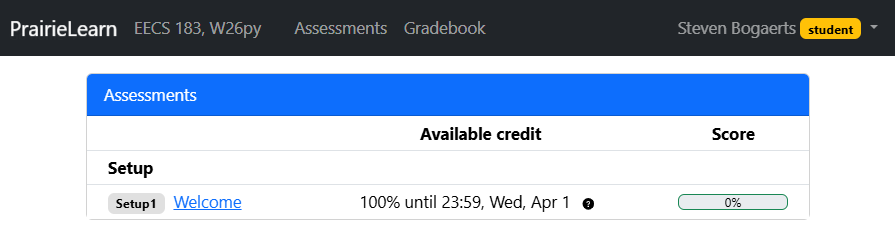
In the image, there’s just one assessment available, entitled “Welcome”. Depending on when you look, you may see other assessments available as well – they’re configured to appear when needed.
Please also note the PrairieLearn tutorial for details about how to use PrairieLearn.
zyBooks
zyBooks is an online platform for interactive textbooks. We have a zyBook that I’ve customized for our class. Unfortunately this tool is not free, but it will be very useful for us, and it includes exercises that are part of your grade.
- Go to https://learn.zybooks.com/signup.
- Make an account using your @umich.edu email address.
- The zyBook code for our course is UMICHEECS183PythonBogaertsWinter2026.
Make sure you use your @umich.edu email address when you sign up!
Please be certain to read the information below so that you know how to complete your zyBook assignments.
Completing zyBook Assignments
Once you’re signed up, you can access the zyBook for our course here: https://learn.zybooks.com/zybook/UMICHEECS183PythonBogaertsWinter2026.
In the zyBook we’re using for this course, a chapter corresponds to a single lecture. For example, chapter 2 corresponds to lecture 2. Within a chapter are sections. For example, section 2.1 is entitled “Programming using Python”.
Chapters must be completed by the respective due dates specified in the course calendar. Nearly all sections require completion of exercises in order to be marked “completed” in our grade book. More specifically, “participation” exercises are graded, while “challenge” exercises are optional but highly recommended in order to do well on exams, get projects more easily, and for practice.
I’ve often included sections labeled optional in the zyBooks chapters. You do not have to look at these at all for the course. They will not be graded. I’ve included them just in case they interest you for your personal growth.
While the zyBook is a great resource, please note that the included Python code doesn’t necessarily follow all of our style guidelines. In particular, it doesn’t use RME comments and doesn’t provide type annotations for parameters and return types. (If you don’t know what these things are yet, don’t worry - we’ll discuss all this soon.) Please make sure that in code you write for this course, that you always follow our style guidelines.
Refunds and Retakes
If you drop the course, you may submit a refund request to zyBooks.
If you are retaking the course, zyBooks offers a free subscription for the retake. The free retake promotion is an opt-in promotion and is not automatically applied. It’s possible that if you took the course in C++, they might now deny it as a Python course. But it’s worth asking. To submit a retake discount request, send an email to support@zybooks.com. Don’t forget to include our new/current zyBook code (UMICHEECS183PythonBogaertsWinter2026); they need that to consider your request.
Did you just switch from a C++ section to a Python section?
If you were enrolled in an EECS 183 C++ section, paid for the C++ zyBook, and are now switching to a Python section, you can request a free switch to the Python zyBook. To do so, send an email from your umich.edu email account to megan [dot] edwards [at] zybooks [dot] com with the subject “University of Michigan - EECS 183 - version switch” and body “I would like to switch from the C++ version to the Python version”.
Copyright and Academic Integrity
© 2026 William Arthur and Steven Bogaerts.
This work is licensed under a Creative Commons Attribution-NonCommercial-ShareAlike 4.0 International License.

All materials provided for this course, including but not limited to labs, projects, notes, and starter code, are the copyrighted intellectual property of the author(s) listed in the copyright notice above. While these materials are licensed for public non-commercial use, this license does not grant you permission to post or republish your solutions to these assignments.
It is strictly prohibited to post, share, or otherwise distribute solution code (in part or in full) in any manner or on any platform, public or private, where it may be accessed by anyone other than the course staff. This includes, but is not limited to:
- Public-facing websites (like a personal blog or public GitHub repo).
- Solution-sharing websites (like Chegg or Course Hero).
- Private collections, archives, or repositories (such as student group “test banks,” club wikis, or shared Google Drives).
- Group messaging platforms (like Discord or Slack).
To do so is a violation of the university’s academic integrity policy and will be treated as such.
Asking questions by posting small code snippets to our private course discussion forum is not a violation of this policy.