In this lab, you will use your knowledge of classes to build a MariaKart racing program! You will race a group of karts (basically, race cars) across a one-dimensional track and declare the winner of the race.
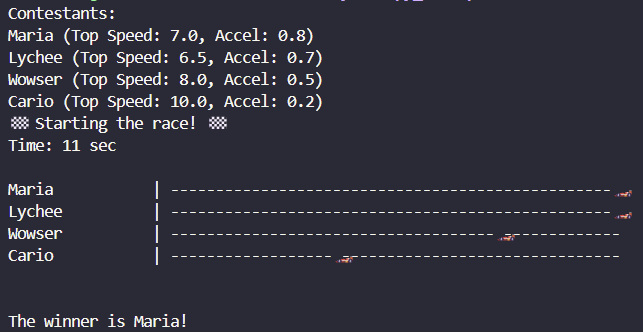
Your complete program will look like this:
The racetrack and time counter will update for every second the race continues.
The starter code we have provided you has two classes: the Kart class and the Simulator class. The Kart class is responsible for all the attributes of a kart. Karts have a top speed, acceleration, and a position on the racetrack. The Simulator class is responsible for actually running the race.
The starter code also handles printing the track. You are responsible for filling out the entirety of the Kart class as well as parts of the Simulator class as per their RMEs. Finally, you will be responsible for filling out main().
Starter Files
You can download the starter files using this link. The starter files include mariakart.py and public_tests.py. You will submit only your mariakart.py to the autograder.
We encourage you to run the public_tests.py file periodically to check the correctness of your implementations. We recommend running tests after you write each function and debugging when needed along the way, rather than writing everything and running the tests only at the end. This will prevent any mistakes from compounding as you call functions from within other functions.
Tasks to Complete
To complete this lab, you need to do the following steps:
Implement the following Kart methods:
__init__()
unlock_kart()
get_current_speed()
move()
check_speed_range()
check_acceleration_range()
__repr__()
Implement the following Simulator methods:
__init__()
The commented parts of simulate_race()
Implement the main() as described below
Submit your code to the Autograder.
Hints
To implement the race animation on the command line, we have implemented
move_cursor_up(), and print_track(). Don’t change these functions. move_cursor_up() has already been called for you in the correct places. You will have to call print_track(): see Step 3c of simulate_race().
simulate_race()
This function acts like the “driver” for your code: it is responsible for conducting the race between all your Karts. Part of the code has already been implemented for you; you should NOT change any of that prewritten code. The steps for conducting a race are below:
STEP 1: Check if all karts are unlocked. If there are karts that
have not been unlocked, print out “Oops! kart {KART NAME} has not been unlocked” for every unlocked kart. Then, return (do not execute the rest of the race).
STEP 2: Print out the race starting message
STEP 3: Iterate through every second in self.duration while the race is not over. Within each iteration:
STEP 3a: Iterate through every Kart and move the Kart
STEP 3b: Print the current time
STEP 3c: Print the track
STEP 3d: Check if the race is over.
The race is considered over if any of the karts have reached or gone beyond
the end position, which is the same as the track_length
> **TIP:** Use the `race_over` variable that has been defined for you already.
STEP 3e: If the race is not over, reset the cursor and update the time
STEP 4: Once the race is over, find the winner. The winner is the
Kart which has gone the furthest. If there is a tie,
tiebreak using the Kart that appears first in self.karts
STEP 5: Print "The winner is [WINNER'S NAME]!"
We have highlighted in green the parts you are responsible for implementing, as well as labelled them
in the starter code and RME. You will have to call methods from both the Kart and Simulator classes throughout this function.
main()
To implement main, you should first create 4 Karts as follows:
Kart 1 is called “Maria” and has an acceleration of 0.8 and a top speed of 7.0.
Kart 2 is called “Lychee” and has an acceleration of 0.7 and a top speed of 6.5
Kart 3 is called “Wowser” and has an acceleration of 0.5 and a top speed of 8.0
Kart 4 is called “Cario” and has an acceleration of 0.2 and a top speed of 10.0
Add these Karts to a list in this order. Print out “Contestants:”, then iterate through every Kart in the list, unlock it, and print it out.
Finally, create a Simulator object. You should pass in the list of Karts you created above, but can use the default values for all other arguments. Then, simulate the race by correctly calling simulate_race().
Sample Output
After implementing and running main(), at the end of the animation, your output for the 4 Karts should look as follows:
Contestants:
Maria (Top Speed: 7.0, Accel: 0.8)
Lychee (Top Speed: 6.5, Accel: 0.7)
Wowser (Top Speed: 8.0, Accel: 0.5)
Cario (Top Speed: 10.0, Accel: 0.2)
🏁 Starting the race! 🏁
Time: 11 sec

Maria           | -------------------------------------------------🏎️
Lychee          | -------------------------------------------------🏎️
Wowser          | ------------------------------------🏎️-------------
Cario           | ------------------🏎️-------------------------------


The winner is Maria!
Running Your Code
In VS Code, you may wish to resize your terminal window (at the bottom) to fully see the output. Due to the way we’re redrawing the output for this lab, you should resize before you run the code. If you wait until after running the code, the output for that run may appear messed up (e.g., duplicated lines).
How to Submit
When ready to submit to the autograder, visit here. You will submit your mariakart.py file only.
IMPORTANT: For all labs in EECS 183, to receive a grade, every student must individually submit the Lab Submission. Late submissions for Labs will not be accepted for credit. For this lab, you will receive ten submissions per day with feedback.
Once you receive a grade of 10 of 10 points from the autograder you will have received full credit for this lab.
All materials provided for this course, including but not limited to labs, projects, notes, and starter code, are the copyrighted intellectual property of the author(s) listed in the copyright notice above. While these materials are licensed for public non-commercial use, this license does not grant you permission to post or republish your solutions to these assignments.
It is strictly prohibited to post, share, or otherwise distribute solution code (in part or in full) in any manner or on any platform, public or private, where it may be accessed by anyone other than the course staff. This includes, but is not limited to:
Public-facing websites (like a personal blog or public GitHub repo).
Solution-sharing websites (like Chegg or Course Hero).
Private collections, archives, or repositories (such as student group “test banks,” club wikis, or shared Google Drives).
Group messaging platforms (like Discord or Slack).
To do so is a violation of the university’s academic integrity policy and will be treated as such.
Asking questions by posting small code snippets to our private course discussion forum is not a violation of this policy.