Project 2 - Rock-Paper-Scissors Simulation
-
Due Friday, 6 Feb, 2026, 8:00 PM Eastern (accepted for full credit until 11:59 PM)
Overview
Rock-Paper-Scissors is a classic hand game played between two people, where each player simultaneously forms one of three shapes with an outstretched hand. The possible shapes are “rock” (a fist), “paper” (an open hand), and “scissors” (a fist with the index and middle fingers extended, forming a V). The rules are simple:
- Rock crushes Scissors (The player choosing Rock wins)
- Scissors cuts Paper (The player choosing Scissors wins)
- Paper covers Rock (The player choosing Paper wins)
- If both players choose the same shape, the game is a draw.
In this project, you will be implementing a Rock-Paper-Scissors Tournament Simulation. Unlike a standard game where you play against the computer one round at a time, your program will process logs of match data. You will take strings of data representing matches, extract the information you need, validate the moves, play out the rounds, and determine the winners.
This project is significantly more difficult than Project 1 and you can expect it to take 2 to 3 times longer to complete.
Please note that this project is rather different from the Rock-Paper-Scissors project being done in the C++ versions of EECS 183.
Objectives
By completing this project, you will gain practice with the following.
- Lecture 5 (Strings & Lists): Iterate over lists using
for item in list, slice strings, and index into strings and lists - Lecture 6 (Functions): Write functions that return values and use parameters to generalize logic
- Lecture 7 (Iteration on lists): Accumulate values in lists and other types, and use lists for tracking information
Getting Started
You can download the starter files using this link. Put its contents in your p2 folder (in EECS_183/projects/p2). You should see two files: rps.py and test.py.
Submission and Grading
Submit your code to the autograder. You will submit two files: rps.py and test.py.
This project must be completed individually (no partners).
Grade Breakdown
- 60 points: Correctness - Implement functions in rps.py
- 10 points: Testing - Implement testing functions in test.py
- 10 points: Style - Code readability in rps.py (we grade your BEST submission)
The deadline is Friday, 6 Feb, 2026 at 8PM Eastern, but:
- If your last submission is before Wednesday, 4 Feb, 2026 at 11:59 PM Eastern, you will receive a 5% bonus.
- If your last submission is before Thursday, 5 Feb, 2026 at 11:59 PM Eastern, you will receive a 2.5% bonus.
You have 3 late days that you can use any time during the semester for projects. There are 3 late days total, not 3 per project. To use a late day, submit to the autograder after the deadline. It will prompt you about using one of your late day tokens. There are more details about late days in the syllabus.
How to get help
Most students in EECS 183 need help from staff and faculty multiple times each project. Furthermore, many people need more help with project 2 than with project 1. We’re here for you!
If your question is about the specification or about something about the project in general, Piazza is the fastest place to get help.
You can meet with us for help in office hours. You can find details on office hours here.
Collaboration Policy and the Honor Code
All students in the class are presumed to be decent and honorable, and all students in the class are bound by the College of Engineering Honor Code. The full collaboration policy can be found in the syllabus.
Course policies, including those on academic integrity, are in place to encourage an effective learning environment for you. We want students to learn from and with each other, and we encourage you to collaborate. We also want to encourage you to reach out and get help when you need it.
Encouraged Collaboration Examples
You are encouraged to:
- Give or receive help in understanding course concepts covered in lecture or lab.
- Practice and study with other students to prepare for assessments or exams.
- Consult with other students to better understand project specifications.
- Discuss general design principles or ideas as they relate to projects.
- Help others understand compiler errors or how to debug parts of their code.
To clarify the last item, you are permitted to look at another student’s code to help them understand what is going on with their code. You are not allowed to tell them what to write for their code, and you are not allowed to copy their work to use in your own solution. If you are at all unsure whether your collaboration is allowed, please contact the course staff via the admin form before you do anything. We will help you determine if what you’re thinking of doing is in the spirit of collaboration for EECS 183.
Prohibited Collaboration Examples
The following are considered Honor Code violations:
- Submitting others’ work as your own.
- Copying or deriving portions of your code from others’ solutions.
- Collaborating to write your code so that your solutions are identifiably similar.
- Sharing your code with others to use as a resource when writing their code.
- Receiving help from others to write your code.
- Sharing test cases with others if they are turned in as part of your solution.
- Sharing your code in any way, including making it publicly available in any form (e.g. a public GitHub repository or personal website).
Autograder Cheating Detection
We run every submission against every other submission and determine similarities. All projects that are “too similar” are forwarded to the Engineering Honor Council. This happens to numerous students each semester. Also know that it takes months to get a resolution from the Honor Council. Discussing the project with other students will NOT be an issue. Sharing code between students, even if it’s just one function, will likely cause the cheating detector to identify both programs as “too similar”. We also search the web for solutions that may be posted online and add these into the mix of those checked for similarities. Searching the web, by the way, is something that we are very good at.
Any violation of the honor policies appropriate to each piece of course work will be reported to the Honor Council, and if guilt is established, penalties may be imposed by the Honor Council and Faculty Committee on Discipline. Such penalties can include, but are not limited to, letter grade deductions or expulsion from the University.
Also note that on all cases forwarded to the Engineering Honor Council the LSA Dean of Academic Affairs is also notified. Furthermore, the LSA rule is students involved in honor violations cannot withdraw from nor drop the course.
Problem Statement
You have two related tasks for this project. First, you will build a simulation engine that reads rock-paper-scissors match data strings and outputs results. Second, you’ll write code to play a match against a random computer opponent.
Let’s define the following vocabulary:
- Move: A single choice that a player makes: either
R(Rock),P(Paper), orS(Scissors) - Round: A single instance of both players making a move
- Match: A series of rounds played between two players
- Tournament: A collection of matches played between different pairs of players
The starter code provides a main function to you that presents the user with a menu:
Welcome to the Rock-Paper-Scissors Tournament!
Would you like to watch a simulated match or play live against the computer?
1) Simulated match
2) Play live
?
At the prompt, the user can enter 1 to run the tournament simulation, or 2 to play a live match against a computer opponent.
Simulation Specification
Match Data Format
A single match data string looks like this:
"Rocky,Creed,RP,RS,SP"
The above means that Rocky is playing against Creed in a match consisting of three rounds. In round 1, Rocky plays Rock (‘R’) and Creed plays Paper (‘P’). In round 2, Rocky plays Rock (‘R’) and Creed plays Scissors (‘S’). In round 3, Rocky plays Scissors (‘S’) and Creed plays Paper (‘P’).
More generally, each match data string has the format:
"Name1,Name2,12,12,12,..."
where the player names are specified first, followed by a variable number of rounds. Each round is represented by two characters where the first character is Player 1’s move and the second character is Player 2’s move. The valid moves are:
- ‘r’ or ‘R’ for Rock
- ‘p’ or ‘P’ for Paper
- ’s’ or ‘S’ for Scissors
Your program must split this string, extract the names, validate the moves (handling errors if the data is bad), determine the winner of each round, and determine the winner of the match.
Sample Output for One Match
For example, if “Rocky,Creed,RP,RS,SP” is the only match in the tournament, then the output would be:
Beginning Tournament Simulation...

----------------------------------------
Match: Rocky vs. Creed
----------------------------------------
r vs p -> Creed wins round
r vs s -> Rocky wins round
s vs p -> Rocky wins round
----------------------------------------
Match Result: Rocky Wins!
----------------------------------------
Tournament Data Format
A tournament consists of multiple matches. For this project, the tournament data is hardcoded into your program as a list of match data strings. For example:
    tournament_data = [
        "Rocky,Creed,RP,RS,SP",
        "Barbie,Ken,RR,SP,PS",
        "Maverick,Goose,RS,RP,SS,PR,SP,RR,PS",
        "Computer,Bug,Px,Pz,RS",
    ]
Your code should work for any such tournament_data list, not just the one above. Each match may have any number of rounds, and there may be any number of matches.
Sample Output for a Tournament
If the above tournament_data list is used, the full output of your program should be as follows. User input is shown in red for clarity below, but will be normal text in your program output.
Welcome to the Rock-Paper-Scissors Tournament!
Would you like to watch a simulated match or play live against the computer?
1) Simulated match
2) Play live
? 1
Beginning Tournament Simulation...

----------------------------------------
Match: Rocky vs. Creed
----------------------------------------
r vs p -> Creed wins round
r vs s -> Rocky wins round
s vs p -> Rocky wins round
----------------------------------------
Match Result: Rocky Wins!
----------------------------------------

----------------------------------------
Match: Barbie vs. Ken
----------------------------------------
r vs r -> Draw
s vs p -> Barbie wins round
p vs s -> Ken wins round
----------------------------------------
Match Result: It's a Draw!
----------------------------------------

----------------------------------------
Match: Maverick vs. Goose
----------------------------------------
r vs s -> Maverick wins round
r vs p -> Goose wins round
s vs s -> Draw
p vs r -> Maverick wins round
s vs p -> Maverick wins round
r vs r -> Draw
p vs s -> Goose wins round
----------------------------------------
Match Result: Maverick Wins!
----------------------------------------

----------------------------------------
Match: Computer vs. Bug
----------------------------------------
ERROR: Invalid move 'x' found. Defaulting to Rock.
p vs r -> Computer wins round
ERROR: Invalid move 'z' found. Defaulting to Rock.
p vs r -> Computer wins round
r vs s -> Computer wins round
----------------------------------------
Match Result: Computer Wins!
----------------------------------------
So that we can automate the testing of your code, the output messages for the rock-paper-scissors game must be exactly the same as presented in this specification and the function RMEs. Making sure they are exact is critical to passing the autograder. To avoid spelling errors, simply copy/paste the appropriate prompt into your code. Note that a spelling error will cause you to fail almost every test case from the autograder. Use of a diffchecker can easily catch such errors.
Live Match Specification
In addition to the tournament simulation, your program must also allow a human player to play a match against a computer opponent that chooses moves at random. The human player will be prompted to enter their move for each round, and the computer will randomly select its move. The match continues until the human player decides to stop playing.
Sample Output for a Live Match
For example, suppose the human player, named “Alice”, wants to play a match consisting of just one round, and chooses Rock (‘r’). If the computer randomly chooses Scissors (‘s’), the output would be as shown below. What the human player types is shown in red for clarity below, but will be normal text in your program output.
Welcome to the Rock-Paper-Scissors Tournament!
Would you like to watch a simulated match or play live against the computer?
1) Simulated match
2) Play live
? 2
Enter your name: Alice
----------------------------------------
Match: Alice vs. RPS 5,000,000 Computer
----------------------------------------

Round 1
Alice, enter your move (R/P/S): r
RPS 5,000,000 Computer chose: s
Alice: r vs RPS 5,000,000 Computer: s -> Alice wins the round!
Do you want to play another round? (y/n): n

----------------------------------------
Match Result: Alice Wins!
----------------------------------------

Match History: [['r', 's']]
If we consider the same scenario, except that the computer randomly chooses Paper (‘p’), the output would be:
Welcome to the Rock-Paper-Scissors Tournament!
Would you like to watch a simulated match or play live against the computer?
1) Simulated match
2) Play live
? 2
Enter your name: Alice
----------------------------------------
Match: Alice vs. RPS 5,000,000 Computer
----------------------------------------

Round 1
Alice, enter your move (R/P/S): r
RPS 5,000,000 Computer chose: p
Alice: r vs RPS 5,000,000 Computer: p -> RPS 5,000,000 Computer wins the round!
Do you want to play another round? (y/n): n

----------------------------------------
Match Result: RPS 5,000,000 Computer Wins!
----------------------------------------

Match History: [['r', 'p']]
Finally, if the computer randomly chooses Rock (‘r’), the output would be:
Welcome to the Rock-Paper-Scissors Tournament!
Would you like to watch a simulated match or play live against the computer?
1) Simulated match
2) Play live
? 2
Enter your name: Alice
----------------------------------------
Match: Alice vs. RPS 5,000,000 Computer
----------------------------------------

Round 1
Alice, enter your move (R/P/S): r
RPS 5,000,000 Computer chose: r
Alice: r vs RPS 5,000,000 Computer: r -> No one wins the round!
Do you want to play another round? (y/n): n

----------------------------------------
Match Result: No one Wins!
----------------------------------------

Match History: [['r', 'r']]
Here’s an example in which the player plays multiple rounds:
Welcome to the Rock-Paper-Scissors Tournament!
Would you like to watch a simulated match or play live against the computer?
1) Simulated match
2) Play live
? 2
Enter your name: Alice
----------------------------------------
Match: Alice vs. RPS 5,000,000 Computer
----------------------------------------

Round 1
Alice, enter your move (R/P/S): p
RPS 5,000,000 Computer chose: p
Alice: p vs RPS 5,000,000 Computer: p -> No one wins the round!
Do you want to play another round? (y/n): y

Round 2
Alice, enter your move (R/P/S): s
RPS 5,000,000 Computer chose: s
Alice: s vs RPS 5,000,000 Computer: s -> No one wins the round!
Do you want to play another round? (y/n): y

Round 3
Alice, enter your move (R/P/S): s
RPS 5,000,000 Computer chose: p
Alice: s vs RPS 5,000,000 Computer: p -> Alice wins the round!
Do you want to play another round? (y/n): y

Round 4
Alice, enter your move (R/P/S): r
RPS 5,000,000 Computer chose: s
Alice: r vs RPS 5,000,000 Computer: s -> Alice wins the round!
Do you want to play another round? (y/n): n

----------------------------------------
Match Result: Alice Wins!
----------------------------------------

Match History: [['p', 'p'], ['s', 's'], ['s', 'p'], ['r', 's']]
Development Cycle with Functions
In Project 1, you divided the program into pieces so you could test each part individually. In Project 2 and later, the program is already divided into functions in the starter code which you can use as the parts to work on. You should write, test, and debug one function at a time.
The functions in a program call each other, and it is easiest to start with the functions that do not call any other functions. For example, in this project, simulate_match will call get_move, so it makes sense to complete get_move before simulate_match. We will be able to test get_move before we write the code that actually uses it in our program.
The order you write the functions may be different than the order they appear in rps.py. We provide a suggested order for writing your functions in the Suggested Timeline.
Program Design Overview
Let’s consider the major pieces of the program and how they’ll fit together when you’re all done. NOTE: This does not suggest the order in which you should write these functions! I’m just describing how they fit together. I recommend that you follow along in the starter code while you read this, and read the corresponding RMEs as well.
First, the main function asks the user to choose between a simulated match or a live match:
Welcome to the Rock-Paper-Scissors Tournament!
Would you like to watch a simulated match or play live against the computer?
1) Simulated match
2) Play live
?
For now, let’s assume the user chooses a simulated match (option 1). I’ll summarize the function calls via a sequence diagram below. It may look a little complicated at first, but we’ll go through the function calls one step at a time, at which point the diagram will serve as a nice summary. You can do this!
%%{init: {'sequence': {'mirrorActors': false}}}%%
sequenceDiagram
    autonumber
    participant main
    participant RPSSimulation as rps_simulation
    participant ProcessMatch as process_match_entry
    participant SimMatch as simulate_match

    main->>RPSSimulation: (Option 1) Call rps_simulation
    activate RPSSimulation

    loop For each match data string
        RPSSimulation->>ProcessMatch: Call process_match_entry
        activate ProcessMatch

        ProcessMatch->>ProcessMatch: print_match_header

        ProcessMatch->>SimMatch: Call simulate_match
        activate SimMatch

        loop For each round
            SimMatch->>SimMatch: get_move (p1)
            SimMatch->>SimMatch: get_move (p2)
            SimMatch->>SimMatch: get_round_winner
        end

        SimMatch->>SimMatch: get_match_winner
        SimMatch-->>ProcessMatch: Return winner name
        deactivate SimMatch

        ProcessMatch-->>RPSSimulation: Return winner name
        deactivate ProcessMatch

        RPSSimulation->>RPSSimulation: print_match_winner
    end

    RPSSimulation-->>main: Back to main, program ends
    deactivate RPSSimulation
Before we consider this code specifically, note the following general points about sequence diagrams:
- Time: We always start in the upper-left corner, and time flows from top to bottom.
- Function execution: Each vertical line represents a function, and the thick parts of the vertical lines represent when that function is active (i.e., it has been called but has not yet finished), while the thin parts mean the function is not active.
- Calling a function: A right-pointing horizontal arrow represents one function calling another. Simpler function calls (e.g.,
print_match_header,get_move) are abbreviated with an arrow that loops back to the same vertical line. - Going back to the caller: A left-pointing horizontal dotted arrow represents a function returning to its caller – either by returning a value or simply finishing execution.
- Loops: Boxes labeled
looprepresent loops over some structure. - Numerically-labeled steps: Note the numbers in circles indicating the sequence of steps and providing handy references for the explanation below.
Follow along in the diagram as you read below. You may want to open this section of the spec again in a new browser tab and put it side by side with your current tab so you can easily refer to the diagram as you read; click here to open this section again in a new tab.
We start in the upper-left of the diagram. We’re assuming here that the user has chosen option 1 for a simulated match. Next, main defines a list called tournament_data and passes it to the rps_simulation function (step 1).
-
rps_simulation: first prints a small opening message beneath what was already printed:... <earlier output here> ... Beginning Tournament Simulation... rps_simulation: considers each match data string in thetournament_datalist, one at a time. For each match data string (Diagram: the largerloopbox),rps_simulationcallsprocess_match_entry(step 2).-
process_match_entry: takes a match string, like"Rocky,Creed,RP,RS,SP"and first extracts the names.print_match_headeris called (step 3), so that the output is now:... <earlier output here> ... Beginning Tournament Simulation... ---------------------------------------- Match: Rocky vs. Creed ---------------------------------------- process_match_entry: obtains the list of rounds (e.g.,["RP", "RS", "SP"]) and callssimulate_match(step 4) to simulate the match.-
simulate_match: for each round (Diagram:loop,[For each round]), callsget_move(steps 5, 6) andget_round_winner(step 7), updates accumulators to track wins, and prints out messages:... <earlier output here> ... Beginning Tournament Simulation... ---------------------------------------- Match: Rocky vs. Creed ---------------------------------------- r vs p -> Creed wins round r vs s -> Rocky wins round s vs p -> Rocky wins round simulate_match: callsget_match_winnerto get the winning player number (step 8).simulate_match: returns the name of the winner (not the player number) (step 9).
-
process_match_entry: returns that name as well, back torps_simulation(step 10).
-
-
rps_simulation: then callsprint_match_winner(step 11) to print the final result:... <earlier output here> ... Beginning Tournament Simulation... ---------------------------------------- Match: Rocky vs. Creed ---------------------------------------- r vs p -> Creed wins round r vs s -> Rocky wins round s vs p -> Rocky wins round ---------------------------------------- Match Result: Rocky Wins! ---------------------------------------- rps_simulation: moves on to the next match data string in the list (Diagram:loop,[For each match data string]) and repeats the process until all matches have been simulated.rps_simulation: Once all matches have been simulated, returns tomain, and the program ends (step 12).
For details on the functions mentioned above, please see the RMEs in the starter code, the sample output above, and the additional notes below.
Use the Provided Program Design
Software design is about more than just making the program work. It is also about organizing your code in a way that is easy to read, understand, test, and debug. In this project, we have provided starter code that designs the program as a group of functions that work together according to their RMEs. Your solution should follow this design. It would be incorrect design to have one function repeat the work that another function already handles.
For example, recall the provided function print_match_header:
def print_match_header(p1_name: str, p2_name: str) -> None:
    """
    Requires: Nothing
    Modifies: Nothing
    Effects: Prints the header information for the match
    """
    print("----------------------------------------")
    print(f"Match: {p1_name} vs. {p2_name}")
    print("----------------------------------------")
I mentioned above that one of the things process_match_entry should do is call print_match_header. So something like this would be correct (where you still need to fill in the ... parts, of course):
def process_match_entry(match_string: str) -> str:
    """
    Requires: match_string is a CSV string in the format:
              "Player1,Player2,XY,XY,XY..."

    Modifies: Nothing

    Effects:  Prints the match header for this match, and calls
              simulate_match on the rounds data.
    """
    ...

# primer-spec-highlight-start
    print_match_header(...)
# primer-spec-highlight-end

    ...
In contrast, this would be incorrect design, because the code from print_match_header is duplicated, instead of just calling the function:
def process_match_entry(match_string: str) -> str:
    """
    Requires: match_string is a CSV string in the format:
              "Player1,Player2,XY,XY,XY..."

    Modifies: Nothing

    Effects:  Prints the match header for this match, and calls
              simulate_match on the rounds data.
    """
    ...

# primer-spec-highlight-start
    print("----------------------------------------")
    print(f"Match: {p1_name} vs. {p2_name}")
    print("----------------------------------------")
# primer-spec-highlight-end

    ...
As another example, recall from the Program Design Overview that process_match_entry is supposed to call simulate_match. Therefore, it would be incorrect to have process_match_entry also simulate the rounds of the match itself. Instead, it should delegate that responsibility to simulate_match.
We still haven’t talked in detail about option 2, in which the user plays a live match. That is handled by the live_match function, which will probably be the last one you implement for this project. We’ll cover it in the next section.
Recommended Implementation Order and Tips
For each function you write:
- Read the RME.
- Write tests for the function in
test.py. - Implement the function in
rps.py.
Make sure your program’s output matches the specification exactly, or else the autograder will mark it wrong.
We recommend that you implement the functions in the order specified below. This order is designed to allow you to test each function as you go, building up to the full simulation. In some cases we’ve also provided below some additional hints for the function.
print_match_winner
get_match_winner
get_round_winner
get_move
You will need a special function called lower() to implement get_move. The function lower is called on a string in a special way as we’ll see in lecture soon. It returns a new string with all uppercase letters converted to lowercase. For example:
letter = "QRS"
result = letter.lower()

print(letter)  # prints QRS
print(result)  # prints qrs
simulate_match
- Must call and use:
get_move,get_round_winner,get_match_winner
This one is more complex than the functions above. You can do it!
p1_name and p2_name are the names of the two players. rounds is a list of strings, where each string represents a round in the match. Each round string has two characters: the first character is Player 1’s move, and the second character is Player 2’s move. For example, ["RP", "RS", "SP"] means that in round 1, Player 1 played Rock and Player 2 played Paper; in round 2, Player 1 played Rock and Player 2 played Scissors; and in round 3, Player 1 played Scissors and Player 2 played Paper.
simulate_match must do the following:
- For each round in the
roundslist- Get player 1’s move, and use the
get_movefunction to make sure it is valid and lowercase. - Do the same for player 2.
- Use
get_round_winnerto determine who won the round. - Print the result of the round in the format specified in the RME.
- Get player 1’s move, and use the
Once you get that working, you’ll need to add two variables to count how many times each player has won. Update them as needed inside your loop. After the loop, call get_match_winner to determine who won the match, and return the name of the winner, or an empty string if it’s a draw.
process_match_entry
- Must call and use:
print_match_header,simulate_match
This function’s purpose is to set things up nicely for simulate_match. Remind yourself of what kind of arguments simulate_match is expecting. But process_match_entry is only given a single string representing the entire match, like "Rocky,Creed,RP,RS,SP". So break this up a bit to get the three arguments you need for simulate_match. Print the match header using the appropriate function, and then call simulate_match.
For process_match_entry, you’ll need a string function we may not have covered yet when you read this: split. Consider the following example:
s = "Rocky,Creed,RP,RS,SP"
data_list = s.split(',')
print(data_list)
This will output:
['Rocky', 'Creed', 'RP', 'RS', 'SP']
That is, the split function breaks a string into a list of substrings based on the delimiter you provide (in this case, a comma). You can use this to easily extract player names and rounds from the match data string.
rps_simulation
- Must call and use:
process_match_entry,print_match_winner
This function should print the opening message (Beginning Tournament Simulation...) and then iterate through the provided tournament_data list, calling process_match_entry for each match data string, and then print_match_winner on each result.
live_match
In the steps above, you wrote many functions to assist rps_simulation, the principle one being simulate_match. One great benefit of splitting code into multiple functions is that we can reuse those functions in different contexts. That’s what we’ll do next in implementing the other option from the main menu: playing a live match against the computer.
live_match tests
Start by writing test functions for live_match in test.py. You may wish to refer back to the sample output for a live match as you write your tests.
Before going any further, look for a moment at the provided code in rps.py. Near the top, you’ll see the following:
# Ignore this until you're working on the live_match function.
# Change this value to any integer (e.g., 12) to set the random seed
# for reproducible computer moves during testing.
# Set to None for unpredictable computer moves.
# primer-spec-highlight-start
SEED = None
# primer-spec-highlight-end
Just after that, you may observe that the SEED constant is used to define the RNG constant, which in turn is used in get_computer_move. You don’t have to understand how RNG and get_computer_move work internally (we’ll talk about such code in a few weeks), but it will be useful for your testing to understand the use of SEED.
get_computer_move randomly chooses a move for the computer player. It randomly chooses a move by randomly generating an integer 0, 1, or 2, and then returning either r, p, or s, respectively. In random number generation, a seed is a value that determines the sequence of random numbers that will be generated. By setting the seed to some integer (for example, 12), we ensure that the sequence of random numbers generated during testing is predictable and reproducible. That is, each time you run your code, the same sequence of “random” numbers will be produced. This can be useful for testing because it allows us to have consistent results across multiple test runs. The number 12 is arbitrary; any fixed integer would work.
For example, on my computer, if I do this:
SEED = 12
and then play four rounds against the computer, the computer chooses the following moves in order: p, r, s, s. If I run the program again, the computer chooses the same sequence of moves again. Your computer might give you a different sequence, but it will be a consistent sequence each time you run your code with the same seed. This makes it easier to write tests for live_match, since you can predict what the computer will do.
If I set a different seed, like this…
SEED = 50
… then my computer gives the sequence s, s, s, s over four rounds. Again, your computer might give you a different sequence, but it will be consistent each time you run your code.
If I want to go back to unpredictable results, I can set:
SEED = None
(Note that there are no quotes around the word None.) With this, each time I run the program, the sequence of moves the computer chooses will be unpredictable.
I recommend that test_live_match simply calls live_match a few times. You may wish to set the SEED value while testing, but make sure your code works for a variety of computer moves. For each call to live_match, plan what input you will provide as a human player, and check the output against the expected output.
live_match implementation
- Must call and use:
print_match_header,get_move,get_computer_move,get_round_winner,get_match_winner,print_match_winner
live_match has some similarities to simulate_match, since they both deal with a match between two players. For practice, though, we’re going to design simulate_match a little differently. Observe the code for simulate_match provided in rps.py, with several “TO DO” comments. Note:
-
The code features a
whileloop. We haven’t talked about these in class yet, so you don’t have to worry about it in detail if you don’t want to. Just note that the code indented under thewhilestatement will run repeatedly as long as (“while”) the Boolean valueplay_gameisTrue. In provided code at the end of the loop,play_gamegets set toTruewhen the human is asked if they’d like to play again, and they enter anything beginning with “Y” or “y”. -
The
nameslist has the the human player (player 1) at index 1, and the computer player (player 2) at index 2. It is convenient to also put the string"No one"at index 0. Why? So that when we callget_round_winner, which returns 0 for a draw, 1 for player 1 win, and 2 for player 2 win, we can use that return value directly as an index into thenameslist to get the name of the winner. -
Similarly, the
winslist has three entries, so that the number of ties is at index 0, number of player 1 wins is at index 1, and player 2 wins at index 2. -
A
historylist is meant to track the moves played in each round of the match. For an illustration, observe thehistoryprinted out at the end of a match in the sample output. -
Note that the computer move is generated randomly, and this code is provided for you. A random
intbetween 0 and 2 (inclusive) is generated, and then mapped to a move using the list['r', 'p', 's'].
Your solution to live_match must make effective use of the following functions from this project:
print_match_headerget_moveget_computer_moveget_round_winnerget_match_winnerprint_match_winner
Thus we see the benefit of breaking the program into functions: we can reuse them in different contexts!
Furthermore, since we have set up live_match to use specially-designed lists names and wins, implement your live_match function without any if statements (nor any additional while, nor match/case, if you happen to know what that is). This will be checked during the manual (done by a human) style grading of your submission. These commands are not necessary in live_match, although some of the functions listed above may use them internally. If you feel you need to use an if statement in live_match, this is a sign that you need to rethink how to make use of the lists, and how to know which index of a given list you need to access.
Using the Functions You’ve Written
This has been stated in context above, but no function should duplicate the work of another function. Instead, functions should call each other as needed to complete their respective tasks. Specifically, note for each function below which other functions it should call (among the ones we’ve written).
| Function | Other functions it should call |
|---|---|
print_match_winner |
Does not use any other functions we’ve written |
get_match_winner |
Does not use any other functions we’ve written |
get_round_winner |
Does not use any other functions we’ve written |
get_move |
Does not use any other functions we’ve written |
simulate_match |
get_move, get_round_winner, get_match_winner |
process_match_entry |
print_match_header, simulate_match |
rps_simulation |
process_match_entry, print_match_winner |
live_match |
print_match_header, get_move, get_computer_move,get_round_winner, get_match_winner, print_match_winner |
Suggested Timeline
25 Jan (Post-Lecture 5)
- Download starter files
- Open
rps.pyand go to theif __name__ == "__main__":block - Write temporary code to practice looping over a list of strings like
["R", "P", "x"]. Also try calling the providedprint_match_header, for example:print_match_header("Alice", "Bob"). Once you’ve practiced these steps, delete this temporary code. - Write a test function for
print_match_winner. - Implement
print_match_winner.
28 Jan (Post-Lecture 6)
- Write test functions for
get_match_winner,get_round_winner, andget_move. - Implement
get_match_winner,get_round_winner, andget_move.
31 Jan (Post-Lecture 7)
- Write test functions for
simulate_match,process_match_entry, andrps_simulation. - Implement
simulate_match,process_match_entry, andrps_simulation.
3 Feb
- Write a test function for
live_match. - Implement
live_match.
4 Feb
- Run the full simulation and play live games. Verify that the output matches the spec exactly.
- Submit before the extra credit deadline.
Where to Begin
- Start Small: Implement one function at a time
- Pseudocode: Write out the logic in English first (comments) before writing Python code
- Trace: Trace your loops on paper. For example, For
simulate_match(), draw the list['RP', 'RS']and track thep1_winsvariable as you step through the loop
Testing Your Code
Before going any further, please study the Testing tutorial. We have provided a file test.py. You should write one test function per function you write in rps.py. Follow the guidelines in the Testing tutorial.
Remember, a computer does not interpret. If you misspell a word, you will fail all autograder test cases. If you omit punctuation, you will fail all autograder test cases. At times, you may find it helpful to use diff tools to compare the Sample Output against the output generated by your code using the same input. Some easy-to-use diff websites that we recommend are:
Write your functions in the order specified in the Recommended Implementation Order and Tips section. This will allow you to test each function in isolation, without needing to have completed later functions first.
When you submit your test code to the autograder, you might see output that looks like this:
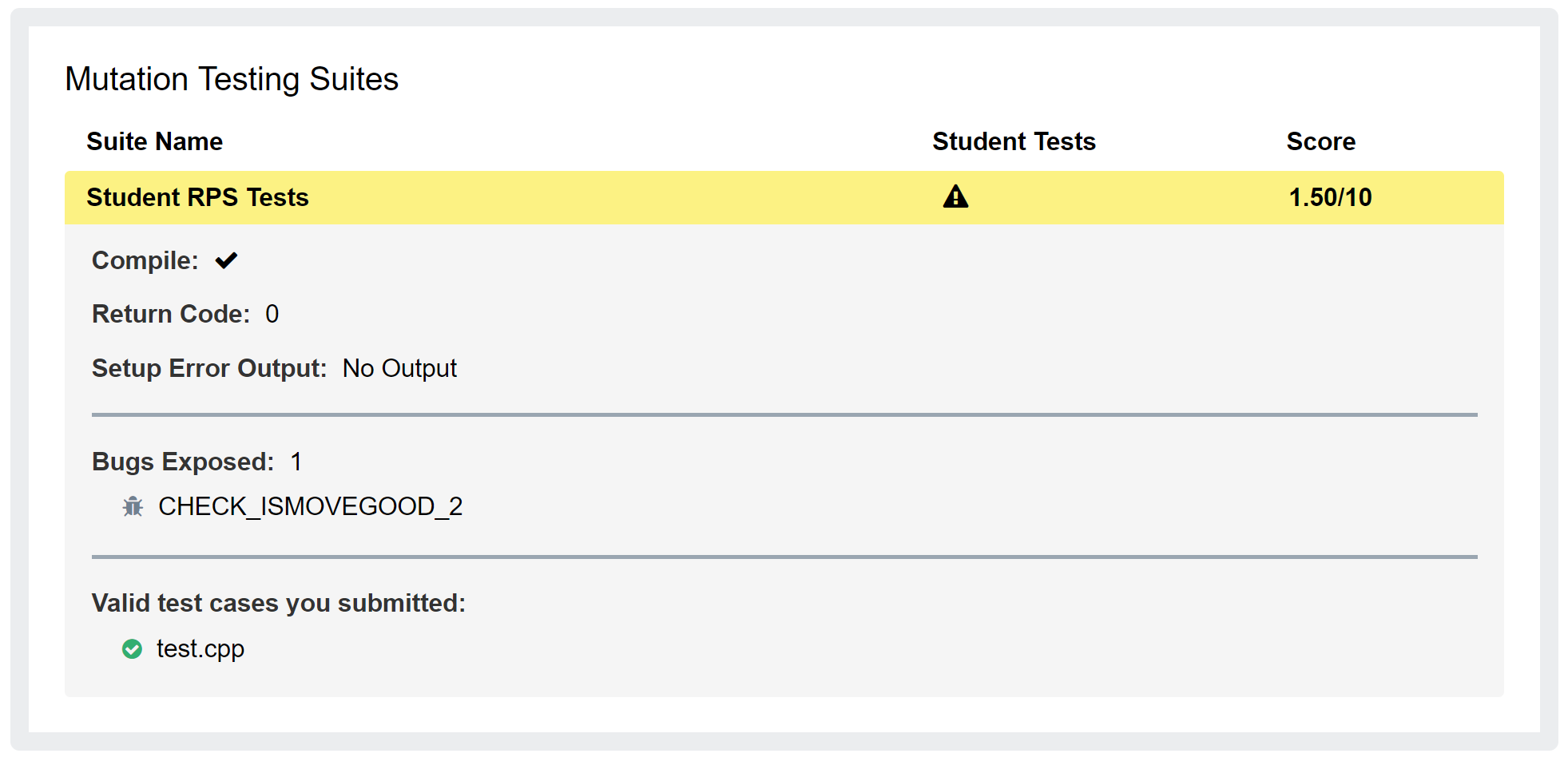
That means that your test suite exposed 1 out of 8 bugs in the staff’s “buggy” implementations and your score for the test suite is 1.5 out of 10 points.
Bugs To Expose
There are a total of 8 unique bugs to find in our implementations. Your tests do not need to expose all of the bugs to receive full points for this part of the project. The autograder will tell you the names of the bugs that you have exposed, from the following set:
- CHECK_ISMOVEGOOD_1
- CHECK_ISMOVEGOOD_2
- CHECK_ANNOUNCEROUNDWINNER_1
- CHECK_ANNOUNCEROUNDWINNER_2
- CHECK_ANNOUNCEWINNER_1
- CHECK_ANNOUNCEWINNER_2
- CHECK_ISROUNDWINNER_1
- CHECK_ISROUNDWINNER_2
Some general hints that apply to all of the bugs to catch:
- Something has to be printed for a test to expose the bug.
- If the function returns anything, you need to print the value returned by the call to the function.
- If the function does not return anything (presumably just prints), you should not try to print the return value since there is no value returned.
Preparing your test.py for Submission
- You will write all your tests and execute them from
start_testsin yourtest.pyfile. - At any time you can submit your
test.pyto the autograder (How to Submit) to see how many bugs your tests exposed. However, remember you only have four submissions each day with feedback.
How to Submit
Write your program using VS Code. Your program must comply with the EECS 183 Python Style Guide.
You must submit both rps.py and test.py for grading. Steps:
- Visit the Autograder
- Click “Choose file” and navigate to your project folder
- Select both
rps.pyandtest.py - Click Submit
- You have 4 submissions with feedback per day. You also have one additional “wildcard” submission with feedback. This can be used once for an additional submit with feedback.
- Your best submission counts as your score
Style
Your code must follow the EECS 183 style guide. That site is the definitive reference for EECS 183 style rules, so please study it and follow it for this and all course work. Below is a non-exhaustive summary a few particular style points of which to be aware.
Readability issues: -1 for each of the following categories:
- Top Comment
- Missing any components of the comment at the top of the file.
- Imports
- Import at the wrong place
- Indentations
- Not using a consistent number of spaces for each level of code indentation
- Spacing
- Not putting a space around operators
- Function headers and function calls with incorrect spacing.
- Blank lines not used to organize code into sections
- Blank spaces at the end of one or more lines
- Variables
- Variable names not meaningful
- Inconsistent variable naming style
- Not using all uppercase SNAKE_CASE for names of constants
- Line Limit
- Going over 80 characters on a line
- Not following the style guide for breaking up a long line
- Not following the style guide for breaking up a long print
- Comments
- Missing space after
# - Insufficient comments or excessive comments
- Commenting on the end of a line of code
- Commented out code
- Unneeded comments left in the code
- Missing space after
Code quality issues: -2 for each of the following categories:
- Global Code
- Global variables other than constants
- Global code other than the standard
ifand call tomain.
- Magic Numbers
- Using magic numbers
- Function Misuse
- Not calling a function from the project where appropriate
- e.g. not calling
get_move()insidesimulate_match()
- e.g. not calling
- Not calling a function from the project where appropriate
- Ineffective Use of Lists
- In
live_match, usingif(or extrawhile, ormatch/caseif you happen to know what that is) statements instead of indexing into the provided lists as needed.
- In
- Egregious Code
- Logic that is clearly too involved or incorrect
-
For example:
if game_1_winner == 1 and game_2_winner == 1 and game_3_winner = 1:
    return 1
elif game_1_winner == 1 and game_2_winner == 1 and game_3_winner == 2:
    return 1
elif game_1_winner == 1 and game_2_winner == 2 and game_3_winner == 1:
    return 1
elif game_1_winner == 2 and game_2_winner == 1 and game_3_winner == 1:
    return 1
elif game_1_winner == 2 and game_2_winner == 2 and game_3_winner == 1:
    return 2
elif game_1_winner == 2 and game_2_winner == 1 and game_3_winner == 2:
    return 2
elif game_1_winner == 1 and game_2_winner == 2 and game_3_winner == 2:
    return 2
else:
    return 0
-
- Logic that is clearly too involved or incorrect
Copyright and Academic Integrity
© 2026 Bill Arthur and Steven Bogaerts.
This work is licensed under a Creative Commons Attribution-NonCommercial-ShareAlike 4.0 International License.

All materials provided for this course, including but not limited to labs, projects, notes, and starter code, are the copyrighted intellectual property of the author(s) listed in the copyright notice above. While these materials are licensed for public non-commercial use, this license does not grant you permission to post or republish your solutions to these assignments.
It is strictly prohibited to post, share, or otherwise distribute solution code (in part or in full) in any manner or on any platform, public or private, where it may be accessed by anyone other than the course staff. This includes, but is not limited to:
- Public-facing websites (like a personal blog or public GitHub repo).
- Solution-sharing websites (like Chegg or Course Hero).
- Private collections, archives, or repositories (such as student group “test banks,” club wikis, or shared Google Drives).
- Group messaging platforms (like Discord or Slack).
To do so is a violation of the university’s academic integrity policy and will be treated as such.
Asking questions by posting small code snippets to our private course discussion forum is not a violation of this policy.