Project 1 - Focaccia Bread
-
Due Friday, 23 Jan, 2026, 8:00 PM Eastern (accepted for full credit until 11:59 PM)
In this project, you will write a program to help you purchase the correct amount of ingredients to make focaccia bread for a party. You will practice the following skills:
- Read a specification document and translate it to a Python program
- Write a large program by completing one small part at a time
- Follow the 4 steps of the development cycle to complete small parts of a program
- Make examples of input and output for that part
- Find the pattern linking the input and output
- Write code
- Test code
- Create test inputs to an entire program and compare the output you expect to the actual output of the program
- Use the autograder system in EECS 183
You will apply skills from the lectures:
- Lecture 2
print, assignment statements, and mathematical expressions
- Lecture 3
- Use ints and floats as needed
- Use functions to round floats up and down
- Get input from the user
- Use f-strings in printing
Getting Started
Starter Files
You will need to have completed tutorials 1 - 3 before proceeding.
You can download the starter files using this link. There’s just one file inside: focaccia.py, which contains some starter code and comments to help you get started. Put that file in your p1 folder (inside of EECS_183, projects). If you need a reminder of how to do any part of that, please review tutorial 1.
Start VS Code so that the EECS_183 folder is open in the EXPLORER view (Tutorial reminder here.) Remember, your EECS_183 folder should always be the one open in VS Code – not just the p1 folder, not Documents, etc. If you open a different folder instead, then VS Code won’t find files we need in EECS_183/.vscode and EECS_183/.venv.
In the EXPLORER view, navigate to projects/p1 and open focaccia.py (Tutorial). Run that code (Tutorial).
If you get an error about a keyboard interrupt, that’s ok – just run the code again.
You should see this:
How many people do you need to serve?
with a blinking cursor at the end. Type any number, like 5. Two blank lines should be printed, and then nothing else and the program ends. If you can do this, you’ve successfully run the starter code!
If this didn’t work, please be sure you’ve completed tutorials 1 - 3 and ask for help as needed.
Submission and Grading
Once you’ve made some progress in the project, you can submit your code to the autograder here. You receive 4 submits each day and your best overall submission counts as your score. There are 60 possible points for correctness and 10 points for style. The style grade will be done by hand after the project is due.
The deadline is Friday, 23 Jan, 2026 at 8PM Eastern, but:
- If your last submission is before Wednesday, 21 Jan, 2026 at 11:59 PM Eastern, you will receive a 5% bonus.
- If your last submission is before Thursday, 22 Jan, 2026 at 11:59 PM Eastern, you will receive a 2.5% bonus.
You have 3 late days that you can use any time during the semester for projects. There are 3 late days total, not 3 per project. To use a late day, submit to the autograder after the deadline. It will prompt you about using one of your late day tokens. There are more details about late days in the syllabus.
How to get help
Most students in EECS 183 need help from staff and faculty multiple times each project. We’re here for you!
If your question is about the specification or about something about the project in general, Piazza is the fastest place to get help.
You can also meet with us for help in office hours. You can find details on office hours here.
Collaboration Policy and the Honor Code
All students in the class are presumed to be decent and honorable, and all students in the class are bound by the College of Engineering Honor Code. The full collaboration policy can be found in the syllabus.
Course policies, including those on academic integrity, are in place to encourage an effective learning environment for you. We want students to learn from and with each other, and we encourage you to collaborate. We also want to encourage you to reach out and get help when you need it.
Encouraged Collaboration Examples
You are encouraged to:
- Give or receive help in understanding course concepts covered in lecture or lab.
- Practice and study with other students to prepare for assessments or exams.
- Consult with other students to better understand project specifications.
- Discuss general design principles or ideas as they relate to projects.
- Help others understand compiler errors or how to debug parts of their code.
To clarify the last item, you are permitted to look at another student’s code to help them understand what is going on with their code. You are not allowed to tell them what to write for their code, and you are not allowed to copy their work to use in your own solution. If you are at all unsure whether your collaboration is allowed, please contact the course staff via the admin form before you do anything. We will help you determine if what you’re thinking of doing is in the spirit of collaboration for EECS 183.
Prohibited Collaboration Examples
The following are considered Honor Code violations:
- Submitting others’ work as your own.
- Copying or deriving portions of your code from others’ solutions.
- Collaborating to write your code so that your solutions are identifiably similar.
- Sharing your code with others to use as a resource when writing their code.
- Receiving help from others to write your code.
- Sharing test cases with others if they are turned in as part of your solution.
- Sharing your code in any way, including making it publicly available in any form (e.g. a public GitHub repository or personal website).
Autograder Cheating Detection
We run every submission against every other submission and determine similarities. All projects that are “too similar” are forwarded to the Engineering Honor Council. This happens to numerous students each semester. Also know that it takes months to get a resolution from the Honor Council. Discussing the project with other students will NOT be an issue. Sharing code between students, even if it’s just one function, will likely cause the cheating detector to identify both programs as “too similar”. We also search the web for solutions that may be posted online and add these into the mix of those checked for similarities. Searching the web, by the way, is something that we are very good at.
Any violation of the honor policies appropriate to each piece of course work will be reported to the Honor Council, and if guilt is established, penalties may be imposed by the Honor Council and Faculty Committee on Discipline. Such penalties can include, but are not limited to, letter grade deductions or expulsion from the University.
Also note that on all cases forwarded to the Engineering Honor Council the LSA Dean of Academic Affairs is also notified. Furthermore, the LSA rule is students involved in honor violations cannot withdraw from nor drop the course.
What are Specifications?
We call each lab and project description in EECS 183 a specification (spec for short). The spec tells you what your program needs to do when you are finished. Specs don’t tell you how to write the program or the steps it takes for you to write the program with the least amount of work. That means that you have a lot of freedom. At the beginning, this freedom means that it is hard to know where to get started, so we’re going to give you some extra advice in later sections below. But first, let’s get more details of what your program needs to do.
Specification
Your task for this project is to create a program that creates a shopping list for focaccia bread. Your program will ask the user how many people they need to serve, and will output how much of each ingredient is needed and what the total cost of the ingredients will be.
Ingredient List
Each loaf of focaccia requires:
- 5 cups flour
- 1 3⁄4 teaspoons instant yeast
- 1 7⁄8 teaspoons salt
- 2 tablespoons olive oil
- 2 cups water
Ingredient Cost and Conversions
| Package of ingredient | How to output in shopping list | Cost | Conversion |
|---|---|---|---|
| 5 pound bag of flour | bag of flour |
$2.69 | 20 cups in 5 pounds |
| package of yeast | package of yeast |
$0.40 | 2.25 teaspoons per package |
| 30 gram canister of salt | canister of salt |
$0.49 | 5 grams per teaspoon |
| 500 milliliter bottle of olive oil | bottles of olive oil |
$6.39 | 14.8 milliliters per tablespoon |
| water | Do not include in shopping list | No cost. Do not include in total cost. |
Pluralization
When the number of batches and the number of each ingredient is printed in the shopping list, the correct pluralization must be used. For example, “2 bottle of olive oil” is not correct, and needs to be output as “2 bottles of olive oil”. We have provided a pluralize function for you that will be useful for this purpose.
The pluralize function may look a bit mysterious at this time. It’s totally ok to not understand it right now. By lecture 6, we will have discussed everything you would need to write such a function yourself from scratch. For now, here are a few tips.
Let’s start with a different example. In lecture 3, we see a function called abs, for computing the absolute value. It can be used in various ways:
num = -5
result = abs(num)
# Now, num is still -5, but result is 5
print(result)    # prints 5

print(abs(num))  # prints 5

print(abs(-5))   # prints 5
To summarize: abs is a function that expects one number, and evaluates to the absolute value of that number. abs is built in to Python; we don’t have to do anything special at all to be able to use it.
What if we want a function to serve some special purpose for us? Something that is not already built into Python? We can define the function ourselves. We’ll learn more about this later, but that’s what the code about the pluralize function is doing – we’re defining a special function for us, to serve a special purpose. Go read the RME (the Requires, Modifies, Effects comment) for pluralize in the starter code to learn more about that purpose and see examples of its use. You will need to use the pluralize function inside of your main function.
Also: remember that the plural of “loaf” is “loaves”.
Formatting for Monetary Amounts
When we print a float, by default all decimal places of the float will print out. When dealing with dollar amounts (and in some other circumstances), this can be a little problematic. First, note of course that a float might have more than two decimal places. For example:
-
Code:
total = 15.299 print(f"The total is: ${total}") -
Output:
The total is: $15.299
Second, sometimes the Python interpreter will give us a float that doesn’t quite match the mathematically precise result, like:
-
Code:
total = 7.1 + 8.2 print(f"The total is: ${total}") -
Output:
The total is: $15.299999999999999
If we want the result mathematically rounded to exactly two decimal places (for cents out of 100), then we can use a little bit of special syntax:
- Code:
total = 7.1 + 8.2
print(f"The total is: ${total:.2f}")
- Output:
The total is: $15.30
The :.2f part means to format this value as a float (f) using 2 digits after the decimal point (.2). Use this syntax when you print the dollar amount near the end of your output.
Output Format
Your program’s output must match the following template.
First, the program must ask the user how many people they wish to serve, and read in an integer from the user. Each loaf feeds 4 people.
How many people do you need to serve?
Then, it should print the number of batches to make and the shopping list. You must make an integer number of batches and purchase an integer number of packages of each ingredient. The parts of the template that will change each run of your program are in bold red below, but of course when you run your program all text will be the same color.
You need to make: 7 loaves of focaccia

Shopping List for Focaccia Bread
--------------------------------
2 bags of flour
6 packages of yeast
3 canisters of salt
1 bottle of olive oil

Total expected cost of ingredients: $15.64

Have a great party!
Sample Runs
Diffchecker
Your program’s output must exactly match the specification, including spelling, symbols, capitalization, spacing, and blank lines. The easiest way to know whether the output is an exact match is to use a tool called a diffchecker, which shows you where differences are. The staff’s favorite website for this is diffchecker.com. Paste the output of a sample run below into “Original Text” and your program’s output into “Changed Text”, then click “Find Difference” to highlight any differences. Note: the autograder will show its own diffchecker; diffchecker.com is helpful for comparing the output on your computer to the expected output below, not when viewing the feedback on the autograder.
The input to the program is given in bold red in these sample runs.
Sample Run 1
How many people do you need to serve? 1


You need to make: 1 loaf of focaccia

Shopping List for Focaccia Bread
--------------------------------
1 bag of flour
1 package of yeast
1 canister of salt
1 bottle of olive oil

Total expected cost of ingredients: $9.97

Have a great party!
Sample Run 2
How many people do you need to serve? 5


You need to make: 2 loaves of focaccia

Shopping List for Focaccia Bread
--------------------------------
1 bag of flour
2 packages of yeast
1 canister of salt
1 bottle of olive oil

Total expected cost of ingredients: $10.37

Have a great party!
Sample Run 3
How many people do you need to serve? 40


You need to make: 10 loaves of focaccia

Shopping List for Focaccia Bread
--------------------------------
3 bags of flour
8 packages of yeast
4 canisters of salt
1 bottle of olive oil

Total expected cost of ingredients: $19.62

Have a great party!
Sample Run 4
How many people do you need to serve? 90


You need to make: 23 loaves of focaccia

Shopping List for Focaccia Bread
--------------------------------
6 bags of flour
18 packages of yeast
8 canisters of salt
2 bottles of olive oil

Total expected cost of ingredients: $40.04

Have a great party!
Sample Run 5
How many people do you need to serve? 2000


You need to make: 500 loaves of focaccia

Shopping List for Focaccia Bread
--------------------------------
125 bags of flour
389 packages of yeast
157 canisters of salt
30 bottles of olive oil

Total expected cost of ingredients: $760.48

Have a great party!
Advice
Now that you know what needs to be done, let’s consider strategies you can apply to this and future programming tasks.
Making Smaller Parts
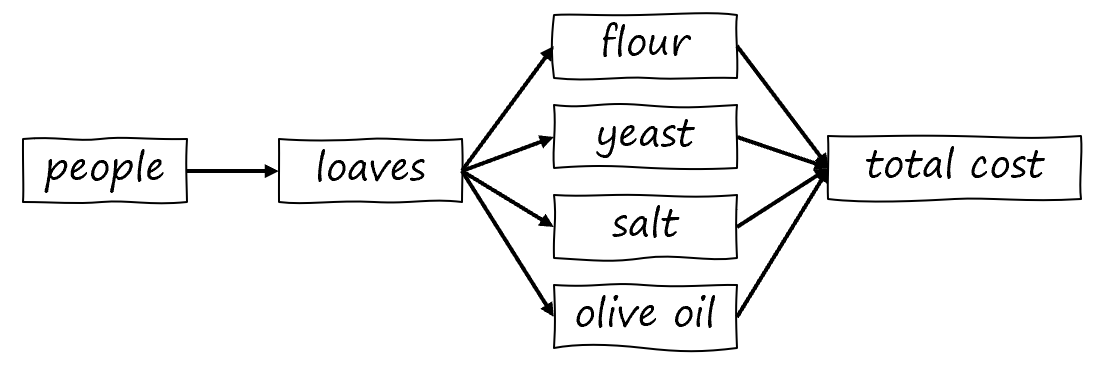
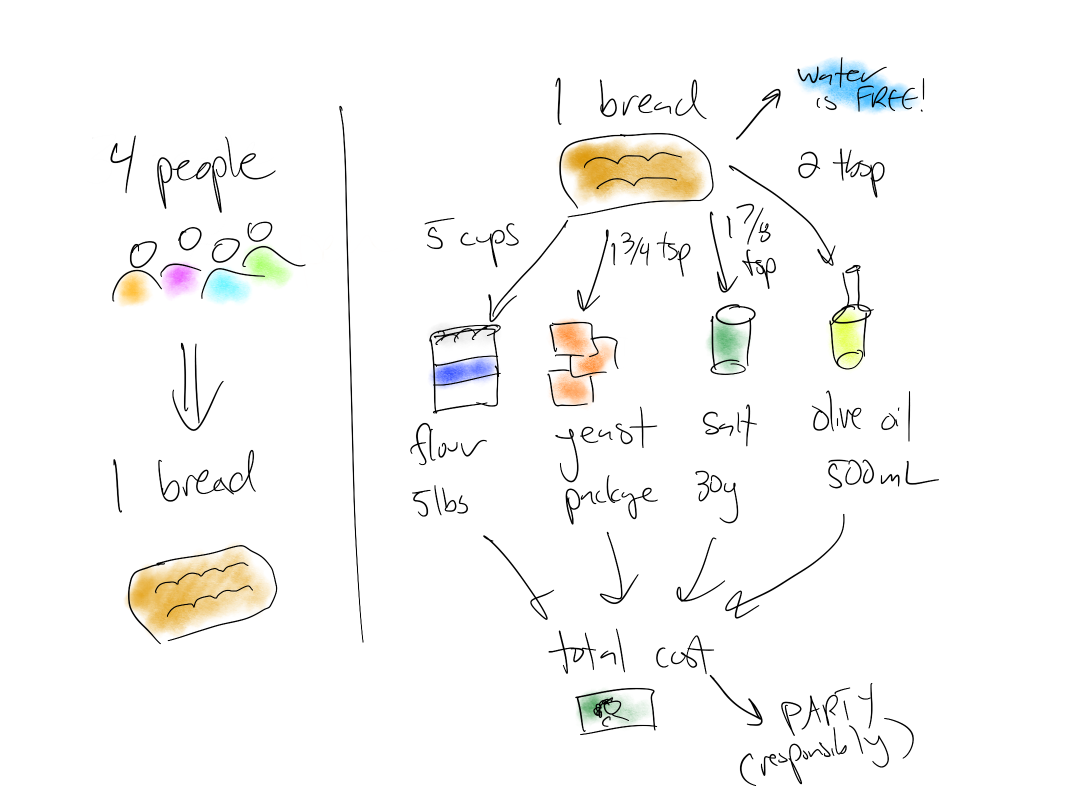
You probably noticed that there are many interconnected parts to this program. For example, the total cost depends on the number of packages of each ingredient, which depends on the number of loaves. Future 183 projects will have more parts that depend on each other in more complicated ways. Because of this, the first step in making a large program is breaking it apart into smaller parts. We’ll build up the program by programming one smaller part at a time.
One way to represent the way things are connected is with a picture. Here is one possible picture for this project:
Here is another:
Why work on one part at a time?
In programming, even experts make mistakes the first time they write part of a program. (The professors can’t write this project without making mistakes!) What makes expert programmers productive is the process they use as write their program which makes these mistakes easier to discover and fix.
As an example, let’s say that we completed Project 1 all at once, then got this incorrect output on a sample run.
| Expected Output | Actual Output |
|---|---|
You need to make: 3334 loaves of focaccia Shopping List for Focaccia Bread -------------------------------- 834 bags of flour 2594 packages of yeast 1042 canisters of salt 198 bottles of olive oil Total expected cost of ingredients: $5056.86 Have a great party! |
You need to make: 1024 loaves of focaccia Shopping List for Focaccia Bread -------------------------------- 321 bags of flour 1194 packages of yeast 9342 canisters of salt 12 bottles of olive oil Total expected cost of ingredients: $9322.32 Have a great party! |
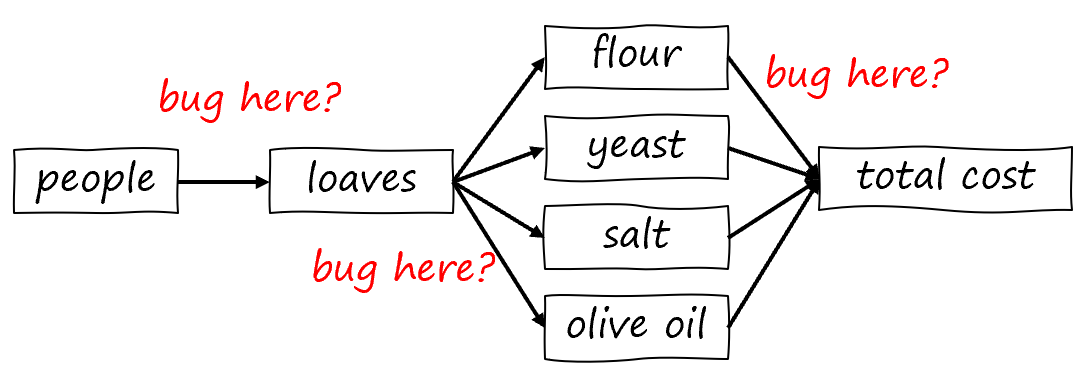
Notice how hard it is to find all the problems, and also how it’s not clear where to start to fix them all. A bug in one part of the program might be affecting a later part of the program. To put this in the picture from earlier, we don’t know which of the steps is the problem:
Development cycle
A better way to write the program would have been focusing on getting one part 100% correct, and only moving onto the next part when it is finished. Here’s how we did this in our Project 1.
Because everything else depends on getting the number of loaves right, we decided to focus on that part first.
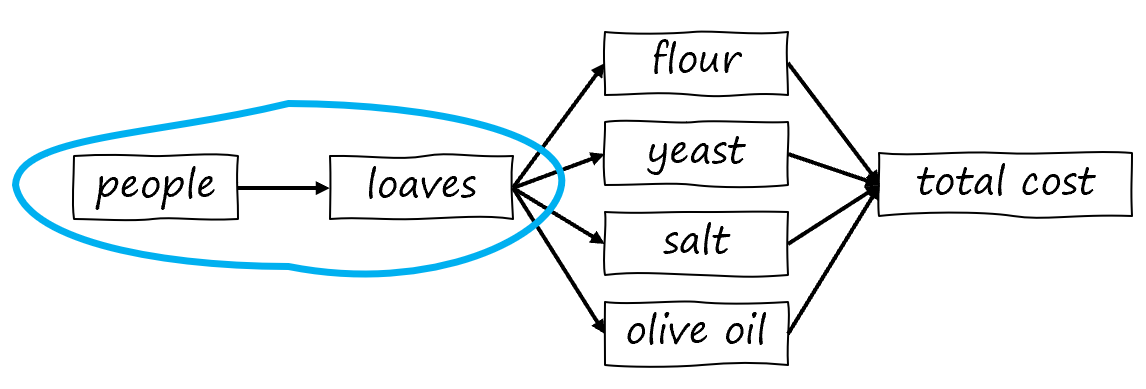
The development cycle describes 4 steps you can follow to build one small part to be 100% correct.
- Make examples of input and the correct output
- Find the pattern linking the input and output
- Write Python code
- Test your code
You’ll be doing this yourself to complete the rest of the project, so follow along with these steps in your IDE.
Step 1: Make examples of input and output
From the specification, we knew that every 4 people requires a loaf of focaccia. To make sure we understood, we wrote out a table of input (number of people) and output (number of loaves).
| Input (people) | Output (loaves) |
|---|---|
| 1 | 1 |
| 2 | 1 |
| 4 | 1 |
| 5 | 2 |
| 0 | 0 |
Step 2: Find the pattern
Once we have the examples, we used them to find the relationship between them. In our experience, there’s a difference between knowing how to do something in your head and how to write it down or explain it to someone else. In this step, we write the algorithm we think will work, then check it against the examples. Most of the time, even for experienced programmers, it takes multiple guesses.
Guess 1: Divide the number of people by 4 using floor division.
Check:
| Input (people) | Output (loaves) |
|---|---|
| 1 | 1 // 4 = 0 (not correct) |
Guess 2: Divide the number of people by 4 using floor division, then add 1.
Check:
| Input (people) | Output (loaves) |
|---|---|
| 1 | (1 // 4) + 1 = 1 |
| 2 | (2 // 4) + 1 = 1 |
| 4 | (4 // 4) + 1 = 2 (not correct) |
Guess 3: Divide the number of people by 4 using true division, then “round up”.
Check:
| Input (people) | Output (loaves) |
|---|---|
| 1 | 1 / 4.0 = 0.25 rounded up gives 1 |
| 2 | 2 / 4.0 = 0.5 rounded up gives 1 |
| 4 | 4 / 4.0 = 1.0 rounded up gives 1 |
| 5 | 5 / 4.0 = 1.25 rounded up gives 2 |
| 0 | 0 / 4.0 = 0.0 rounded up gives 0 |
All our examples match, which makes us confident this algorithm will work.
Step 3: Write Python code
Now that we have the pattern, we need to translate the steps into Python. From Lecture 3, we remembered that / does true division in Python. From there, we can “round up” the result using the ceil function (requiring import math at the top of the code).
We wrote our code in the main function of focaccia.py:
def main():
    people = int(input("How many people do you need to serve? "))

    print()
    print()

    PEOPLE_PER_LOAF = 4

    loaves = math.ceil(people / PEOPLE_PER_LOAF)

    # This code will say "loaves" even when there is only one loaf.
    # You will fix this in a later step.
    print(f"You need to make: {loaves} loaves of focaccia")
Step 4: Test your code
Using the examples we thought of in Step 1, we can test whether our code works the way we expect by running the code in our IDE.
| Input (people) | Output (loaves) |
|---|---|
| 1 |
How many people do you need to serve? 1 You need to make: 1 loaves of focaccia |
| 2 |
How many people do you need to serve? 2 You need to make: 1 loaves of focaccia |
| 4 |
How many people do you need to serve? 4 You need to make: 1 loaves of focaccia |
| 5 |
How many people do you need to serve? 5 You need to make: 2 loaves of focaccia |
| 0 |
How many people do you need to serve? 0 You need to make: 0 loaves of focaccia |
We’ll talk about how to fix the “loaf” vs. “loaves” issue in the output later.
With the above testing in VS Code done, we might decide at this point to use one of our daily autograder submissions to see if the autograder agrees that this part is correct. It’s up to you when you want to use your daily submissions. Just make sure you test your code on your computer first before submitting to the autograder.
Your turn: bags of flour
We’ll follow the same steps together for the next small piece of our program: computing the number of bags of flour.
Step 1: Make examples of input and output
The output of this piece of the program will be the number of bags of flour, but we could choose input to be either the number of people or the number of loaves. Using the number of loaves is the better choice, because we already know how to translate the number of people to loaves. We’ve given you some useful test inputs – your job is to compute what the outputs will be.
This isn’t a worksheet you need to hand in, so you can do this in your notes.
| Input (loaves) | Output (bags of flour) |
|---|---|
| 1 | 1 |
| 9 | [your answer here] |
| 30 | [your answer here] |
| 75 | 19 |
Step 2: Find the pattern
Guess 1: Multiply the number of loaves by 5 then divide by 20
Check:
| Input (loaves) | Output (bags of flour) |
|---|---|
| 1 | 0.25 (not correct) |
Do more guesses and checks until you find an algorithm that produces the output from Step 1.
Step 3: Write Python Code
Let’s start by translating your algorithm into a single line of code by filling in the blank:
flour_bags = _________________________________
What you likely found was that you had some magic numbers in that formula, like 20. Numbers without an explanation of what they mean are called magic numbers and are not allowed according to our style guide, because someone else reading your code will not know what they represent. The style guide directs us to put these into constants. Fill in the blanks in this revised version of the code that uses constants.
FLOUR_CUPS_PER_LOAF = ____________________________________
FLOUR_CUPS_PER_BAG = ____________________________________
# use these constants on the following line:
flour_bags = _________________________________
# temporary; you'll need to change this later to get pluralization correct:
print(f"{flour_bags} bags of flour")
Put this code in main (indented one level) after the code computing the number of loaves.
Step 4: Test your code
Run your program, and use the examples you developed in Step 1 to test your program. Remember that the input to your program is the number of people, not the number of loaves! Here’s a table we used to help us test:
| Input to program (number of people) | Loaves | Output (bags of flour) |
|---|---|---|
| 1 | ||
| 9 | ||
| 30 | ||
| 75 |
Roadmap and Timeline
From here, finish the project by adding one small feature at a time. These were the steps we followed to finish Project 1:
- Compute number of loaves
- Printed correct one of “loaf” or loaves” in the “You need to make” output line
- Compute number of bags of flour
- Print correct one of “bag” or “bags” of flour
- Repeat for all ingredients
- Compute cost of bags of flour
- Add cost of bags of flour to total and print total
- Repeat for all ingredients
- Add header and footer messages
- Test entire program using sample runs in Sample Runs section
- Use diffchecker to compare program output and sample run (details in Sample Runs section)
- Debug problems discovered
- Submitted to autograder
- Debug problems that autograder reveals
- Read the style guide and verify that your code follows it
Timeline
As an approximate timeline, you are on track if by:
- 13 Jan: You can open the
EECS_183folder in VS Code and run the starter code. You’ve read the entire specification and understand what the program needs to do. - 15 Jan: The number of loaves and bags of flour are working in your IDE; one new ingredient and cost works as expected
- 17 Jan: All ingredients added, program passes sample runs, score greater than 0 on autograder
- 19 Jan: Debugging in progress, passes all sample runs, 80% or higher on autograder, double-checking code style
- 21 Jan: Make last submission to autograder for 5% extra credit
Things to get used to when programming
Spelling and spacing must match exactly
Computers pay attention to every little detail, so your program needs to match the sample outputs and the tests on the autograder exactly. This includes spelling, capitalization, and all symbols.
It is normal for things to not work the first time
Most of the skill in programming is in debugging and finding problems, since everyone makes them!
The autograder can find problems you didn’t see
For this project, the best time to submit to the autograder is as soon as you pass one of the sample runs. In general, you can’t assume that because the program works on your computer it will work on the autograder. Many times there are some adjustments that you need to make.
How to Submit
You’ll need to upload your code to the autograder. For this project, it must be a single file, and it must be called focaccia.py. If you’ve been following recommendations as in Tutorial 1, your file should be in your EECS_183 folder, projects, p1. If you’re having trouble finding your focaccia.py file and you have it open in VS Code, please review these instructions for how to find it.
When you’re ready to submit, visit the autograder. Click “Choose files to upload” and navigate to your file. The file you submit to the autograder MUST be called focaccia.py.
Style Guide
Your code must follow the EECS 183 Python style guide. Please start by reading the section on Flake8. Next, please read the style_demo.py file. This file solves a much simpler programming problem than you’re doing for project 1, but mostly the same style issues apply. Copy-paste the links in that file to read the corresponding portions of the style guide, and use it as another guide as you learn the style rules. I know there seems to be a lot of rules right now, but soon it will all be very clear for you.
Please also read this note about advice from course staff on coding style.
To view all this another way: below is a list of items to consider in the style rubric for project 1. Please note the links to the relevant portions of the style guide.
Project 1 Style Rubric
Readability issues: -1 for each of the following categories:
- Top Comment
- Missing any components of the comment at the top of the file.
- Imports
- Import at the wrong place
- Indentations
- Not using a consistent number of spaces for each level of code indentation
- Spacing
- Not putting a space around operators
- Function headers and function calls with incorrect spacing.
- Blank lines not used to organize code into sections
- Blank spaces at the end of one or more lines
- Variables
- Variable names not meaningful
- Inconsistent variable naming style
- Not using all uppercase SNAKE_CASE for names of constants
- Line Limit
- Going over 80 characters on a line
- Not following the style guide for breaking up a long line
- Not following the style guide for breaking up a long print
- Comments
- Missing space after
# - Insufficient comments or excessive comments
- Commenting on the end of a line of code
- Commented out code
- Unneeded comments left in the code
- Missing space after
Code quality issues: -2 for each of the following categories:
- Global Code
- Global variables other than constants
- Global code other than the standard
ifand call tomain.
- Magic Numbers
- Using magic numbers
- Function Misuse
- Not calling
pluralizewhen appropriate
- Not calling
- Egregious Code
- Logic that is clearly too involved or incorrect
-
e.g. instead of basing numbers on conversions, writing:
if loaves == 1:
    # do something
elif loaves == 2:
    # do something else
# and so on
-
- Logic that is clearly too involved or incorrect
Copyright and Academic Integrity
© 2026 Bill Arthur and Steven Bogaerts.
This work is licensed under a Creative Commons Attribution-NonCommercial-ShareAlike 4.0 International License.

All materials provided for this course, including but not limited to labs, projects, notes, and starter code, are the copyrighted intellectual property of the author(s) listed in the copyright notice above. While these materials are licensed for public non-commercial use, this license does not grant you permission to post or republish your solutions to these assignments.
It is strictly prohibited to post, share, or otherwise distribute solution code (in part or in full) in any manner or on any platform, public or private, where it may be accessed by anyone other than the course staff. This includes, but is not limited to:
- Public-facing websites (like a personal blog or public GitHub repo).
- Solution-sharing websites (like Chegg or Course Hero).
- Private collections, archives, or repositories (such as student group “test banks,” club wikis, or shared Google Drives).
- Group messaging platforms (like Discord or Slack).
To do so is a violation of the university’s academic integrity policy and will be treated as such.
Asking questions by posting small code snippets to our private course discussion forum is not a violation of this policy.