Project 3 - Ciphers
-
Due Friday, 27 Feb, 2026, 8:00 PM Eastern (accepted for full credit until 11:59 PM)
Overview
In this project, we’ll explore cryptography. You’ll encrypt and decrypt messages using various encryption algorithms.
Objectives
- To have fun.
- To practice loops.
- To gain experience with strings.
- To become better acquainted with functions and libraries.
- To allow you to dabble in cryptography.
Grading
- 10 points testing.
- Write a test suite in
test.py.
- Write a test suite in
- 60 points correctness.
- To what extent does your code implement the features required by our specification?
- To what extent is your code consistent with our specifications and free of bugs?
- 10 points style.
- To what extent is your code written well?
- To what extent is your code readable?
- Consult the EECS 183 Python Style Guide and check the Style Checklist at the end of this project’s specification for some tips!
- If your last submission is on Wednesday, 25 Feb, 2026 you will receive a 5% bonus on your autograder score. If your last submission is on Thursday, 26 Feb, 2026, you will receive a 2.5% bonus.
Starter Files
Download the starter files using this link. You’ll find these files:
utility.py: Defines some helper functions.caesar.py: Defines functions for the Caesar cipher.vigenere.py: Defines functions for the Vigenere cipher.polybius.py: Defines functions for the Polybius cipher.ciphers.py: Defines a function that allows the user to encrypt and decrypt messages. This file uses functions fromutility.py,caesar.py,vigenere.py, andpolybius.py.start.py: A program that allows you to select between executing your tests intest.pyand using the ciphers you have created.
Additionally, you’ll be working with this file that you’ll have to create yourself:
test.pyA test suite for functions declared inutility.py,caesar.py,vigenere.py, andpolybius.py. Its job is to reveal bugs that someone (e.g. you or staff) could have made while implementing those functions. All testing should be done by printing to the standard output.
The starter code will crash until you create a test.py file with a start_tests function. More details can be found in the section on creating test.py.
Suggested Timeline
As an approximate timeline, you will be on track if by:
- 9 Feb: Starter code downloaded and new project set up in VS Code. All necessary file(s) created. Code can run in VS Code. Code can run on the autograder (submit to verify). You’ve read through the spec.
- 13 Feb: Functions in
utility.pyimplemented, fully tested, and passed on the autograder. Associated testing functions intest.pyimplemented, working, and catching the associated bugs on the autograder. Suggested order:remove_non_alphas,remove_duplicate. - 18 Feb: Functions in
caesar.pyimplemented, fully tested, and passed on the autograder. Associated testing functions intest.pyimplemented, working, and catching the associated bugs on the autograder. Necessary order:shift_alpha_character,caesar_cipher - 20 Feb:
vigenere_cipherimplemented, fully tested, and passed on the autograder. Associated testing function intest.pyimplemented, working, and catching the associated bug(s) on the autograder. - 23 Feb: Functions in
polybius.pyimplemented, fully tested, and passed on the autograder. Associated testing functions intest.pyimplemented, working, and catching the associated bugs on the autograder. Suggested order:mix_key,fill_grid,find_in_grid,polybius_square. Began working onciphers. - 24 Feb:
ciphersand all other code should be completed. Debugging in progress. Passing all individual function tests, 80% or higher on autograder. - 25 Feb: Last day to still get 5% extra credit for your project 3 submission!
- Friday, 27 Feb, 2026: Final due.
- If at any point your code is not working as intended, review the debugging tips from the debugging tutorial. If you invest the time to learn these tips, you will save a significant amount of time in the long run.
Collaboration Policy and the Honor Code
All students in the class are presumed to be decent and honorable, and all students in the class are bound by the College of Engineering Honor Code. The full collaboration policy can be found in the syllabus.
Course policies, including those on academic integrity, are in place to encourage an effective learning environment for you. We want students to learn from and with each other, and we encourage you to collaborate. We also want to encourage you to reach out and get help when you need it.
Encouraged Collaboration Examples
You are encouraged to:
- Give or receive help in understanding course concepts covered in lecture or lab.
- Practice and study with other students to prepare for assessments or exams.
- Consult with other students to better understand project specifications.
- Discuss general design principles or ideas as they relate to projects.
- Help others understand compiler errors or how to debug parts of their code.
To clarify the last item, you are permitted to look at another student’s code to help them understand what is going on with their code. You are not allowed to tell them what to write for their code, and you are not allowed to copy their work to use in your own solution. If you are at all unsure whether your collaboration is allowed, please contact the course staff via the admin form before you do anything. We will help you determine if what you’re thinking of doing is in the spirit of collaboration for EECS 183.
Prohibited Collaboration Examples
The following are considered Honor Code violations:
- Submitting others’ work as your own.
- Copying or deriving portions of your code from others’ solutions.
- Collaborating to write your code so that your solutions are identifiably similar.
- Sharing your code with others to use as a resource when writing their code.
- Receiving help from others to write your code.
- Sharing test cases with others if they are turned in as part of your solution.
- Sharing your code in any way, including making it publicly available in any form (e.g. a public GitHub repository or personal website).
Autograder Cheating Detection
We run every submission against every other submission and determine similarities. All projects that are “too similar” are forwarded to the Engineering Honor Council. This happens to numerous students each semester. Also know that it takes months to get a resolution from the Honor Council. Discussing the project with other students will NOT be an issue. Sharing code between students, even if it’s just one function, will likely cause the cheating detector to identify both programs as “too similar”. We also search the web for solutions that may be posted online and add these into the mix of those checked for similarities. Searching the web, by the way, is something that we are very good at.
Any violation of the honor policies appropriate to each piece of course work will be reported to the Honor Council, and if guilt is established, penalties may be imposed by the Honor Council and Faculty Committee on Discipline. Such penalties can include, but are not limited to, letter grade deductions or expulsion from the University.
Also note that on all cases forwarded to the Engineering Honor Council the LSA Dean of Academic Affairs is also notified. Furthermore, the LSA rule is students involved in honor violations cannot withdraw from nor drop the course.
Working with a Partner
- For Projects 3 and 4, you may choose to work with one other student who is currently enrolled in EECS 183 Python.
- You may change partners between projects, e.g., you may have a different partner for project 3 than for project 4.
- You may not change partners during a project.
- Although you are welcome to work alone if you wish, we encourage you to consider partnering up for Projects 3 and 4. If you would like a partner but don’t know anyone in the class, we encourage you to use the Search for Teammates post on Piazza to find someone! Please make sure to mark your search as Done once you’ve found a partner.
- As a further reminder, a partnership is defined as two people. Outside of your partnership, you are encouraged to help each other and discuss the project in English (or in some other human language), but don’t share project code with anyone but your partner. See the course Honor Code documentation for details.
- To register a partnership on the autograder, go to the autograder link for the project and select “Send group invitation”. Then, add your partner to the group by entering their email when prompted. They will receive a confirmation after registration, and must accept the invitation before the partnership can submit. You must choose whether or not to register for a group on the autograder before you can submit. If you select the option to work alone, you will not be able to work with a partner later in the project. If a partnership needs to be changed after you register, you may submit an admin request.
- The partnership will be treated as one student for the purpose of the autograder, and you will not receive additional submits beyond the given four submits per day.
- If you decide to work with a partner, be sure to review the guidelines for working with a partner.
- If you choose to use late days and you are working in a partnership, review this section for how late days will be charged against each partner.
Warm-up
To make working on this project easier and more fun, be sure you’re able to answer the following questions:
- Recall the modulo operator,
%. What does it do? - How can you compute the length of a given string?
- Suppose you have a variable of type
strcalledword, and thatwordis of some positive length.- Without knowing
word’s length in advance, how could you print its first character? - How about the last character?
- How would you print
word’s nth character?
- Without knowing
- How can you represent an empty string, i.e. a string of length 0?
-
Suppose you have this code:
  first_name = "Julius"
  last_name = "Caesar"
and that you’d like to have another
str,full_name, that would join (i.e. concatenate)first_nameandlast_name, so as to get"Julius Caesar". How can you do this? - What’s the difference between
0and'0'? - How can you determine if a character is a lowercase letter?
- How can you determine if a character is an uppercase letter?
- How can you determine if a character is alphanumeric or alphabetical?
Getting Started
ASCII, ord, and chr
For this project, you’ll need to know a little bit about working with ASCII values. ASCII is an acronym for American Standard Code for Information Interchange and is pronounced “ASK-ee”. It’s a character encoding standard that assigns an integer to each letter, digit, punctuation mark, and other characters.
For example, the ASCII value for uppercase A is 65, for lowercase a is 97, and for digit 0 is 48. You don’t need to memorize these! The actual numbers don’t matter, only the relationships between them. That is, the ASCII values for uppercase letters are consecutive, so A is 65, B is 66, C is 67, and so on up to Z, which is 90. Similarly for lower-case letters, a is 97, b is 98, and so on up to z, which is 122. Take a moment to peak at the list of ASCII values at w3schools.com. Observe that the table indicates that A is 65, etc. Also note that the ASCII value for a character representing a number is not the number itself - for example, the ASCII value for the character 3 is 51.
For this project, you’ll need two functions we haven’t talked about in class before. Both functions deal with ASCII values. They’re built in to Python - no need to import anything to use these functions.
ord(as in “ordinal”) takes a string containing a single character, and returns the corresponding ASCII valuechr(as in “character”) takes an ASCII value and returns the corresponding character. For example:
print(ord('A'))  # prints 65
print(chr(65))   # prints 'A'
Contrast the above with what we’ve already seen about casting:
# print(int("A")) # ValueError!
print(str(65))    # prints '65'
ASCII values are helpful for us in this project, but they aren’t exactly what we want. We’ll want to think of letters in terms of their position in the alphabet. Let’s say that ‘A’ (whether upper or lower case) is at position 0, ‘B’ is at position 1, and so on up to ‘Z’ at position 25.
Note, then, the following code:
letter = 'C'
print(ord(letter) - ord('A'))  # Prints 2
More generally, if you have an upper-case letter in the variable upper_letter, you can find its position in the alphabet with ord(upper_letter) - ord('A'). Similarly, for a lower-case letter in the variable lower_letter, you can find its position in the alphabet with ord(lower_letter) - ord('a').
Since we know that the ASCII value for ‘A’ is 65, the following code would also work, but it’s not good style…
letter = 'C'
print(ord(letter) - 65)  # Prints 2, but this is bad style!
Never write code that directly refers to ASCII values. Instead, always use ord with the needed character.
You’ll need to use ord and chr a bit in this project, so be sure you practice with them a bit.
Multiple Files
For Projects 1 and 2, your code was all in a single file. It had a main function, where we started the code execution, and then some other functions that were called from main or from other functions. But as a program gets more complicated, the file becomes very long and it gets more difficult to organize and test the program.
Thus, a common practice is to break a program up into multiple files. We can then import files as needed to get access to the needed functions. Let’s consider a little example. Suppose we have two files, math_utils.py and main.py. In math_utils.py, we define some functions that do mathematical calculations:
# math_utils.py
def add(a: int, b: int) -> int:
    return a + b


def multiply(a: int, b: int) -> int:
    return a * b


def do_some_math() -> None:
    # Test the functions in this file
    print(add(2, 3))        # prints 5
    print(multiply(2, 3))   # prints 6


if __name__ == '__main__':
    do_some_math()
The file above is only useful for this demonstration of using multiple files. Otherwise, there’d be no reason to write add and multiply functions that just do what the operators + and * do on ints.
Notice that there’s a do_some_math function that gets called at the bottom. It will get called only if we run math_utils.py directly, though. If instead we import math_utils from another file, do_some_math will not get called automatically. The if __name__ == '__main__': check is what makes the code behave in this way.
In main.py, we can import and use these functions:
# main.py
# primer-spec-highlight-start
import math_utils
# primer-spec-highlight-end

def main() -> None:
    print("Welcome to my amazing math program!")
    x = int(input("Enter first number: "))
    y = int(input("Enter second number: "))
# primer-spec-highlight-start
    print(math_utils.add(x, y))
    print(math_utils.multiply(x, y))
# primer-spec-highlight-end

if __name__ == '__main__':
    main()
Notice the higlighted lines in the above code. In main.py, we import the math_utils file using the import statement. This gives us access to all the functions defined in math_utils.py. To call a function from math_utils, we prefix it with math_utils.. For example, to call the add function, we write math_utils.add(x, y). This is the same syntax we saw using the built-in math module, except now we’re importing one of our own files!
If you want to, you can also assign an abbreviation to an imported module, and then use it when you call the corresponding functions. In the code below, I’m abbreviating math_utils as mu:
# main.py
# primer-spec-highlight-start
import math_utils as mu
# primer-spec-highlight-end

def main() -> None:
    print("Welcome to my amazing math program!")
    x = int(input("Enter first number: "))
    y = int(input("Enter second number: "))
# primer-spec-highlight-start
    print(mu.add(x, y))
    print(mu.multiply(x, y))
# primer-spec-highlight-end

if __name__ == '__main__':
    main()
In this project, we’ll split our program up into multiple files, for better organization.
Creating a Project
In the starter code, you’ll find utility.py, caesar.py, vigenere.py, and polybius.py with headers for various functions.
You’ll also find ciphers.py, the driver that makes use of the ciphers you’ve implemented. Finally, there is a file start.py which contains a main function as a place to start execution of the program. This function will allow you to choose between executing your test cases or using the ciphers you have written.
Your project will not run until you have created a test.py with a start_tests function. You can see how to do this in the next section, Test Suite.
ciphers.py, start.py, and test.py all play roles similar to that of main.py in the section above on Multiple Files. That is, you’ll need to import your other files to get access to the functions defined in them.
As usual, the code in start.py will print the project menu with options to either run the tests in test.py or call the driver function for the project, ciphers.
- Enter 1 to select executing your test cases starting with the
start_testsfunction intest.py - Enter 2 to select executing your ciphers starting with the
ciphersfunction inciphers.py
For example, your program might run as follows (bold red text represents the user’s input):
-------------------------------
EECS 183 Project 3 Menu Options
-------------------------------
1) Execute testing functions in test.cpp
2) Execute ciphers() function to use ciphers
Choice --> 1

Testing shift_alpha_character
letter: A shifted 2 is C
...
Test Suite
Creating test.py
I recommend that you review the Testing tutorial before continuing.
- As you write code, it’s important to test it! Catching and fixing bugs early is much easier than later on; this will save you hours when you work. So you’ll be required to create and submit a test suite for this project.
The best practice is to write tests before even implementing functions. Writing tests will make implementing the function faster/easier.
Create a new file and call it test.py. At the top of the file, put a multiline comment with the project’s name, your name and uniqname, your partner’s name and uniqname, if you have one, and a short description for this test file. This file will in fact test the functions defined in utility.py, caesar.py, vigenere.py, and polybius.py so be sure to add these lines after the multiline comment:
import utility
import caesar
import vigenere
import polybius
Next, write a start_tests function in test.py. This file will test functions declared in utility.py, caesar.py, vigenere.py, and polybius.py via standard output, so you’ll be calling those functions many times. Here’s a good way to start it:
import utility
import caesar
import vigenere
import polybius


def startTests():
    test_shift_alpha_character()
    # Repeat for all other functions to be tested


def test_shift_alpha_character():
    print("Now testing function shift_alpha_character()")
    print("Expected: 'a', Actual: '" + shift_alpha_character('a', 0) + "'")
    print("Expected: 'b', Actual: '" + shift_alpha_character('a', 1) + "'")
    print("Expected: 'd', Actual: '" + shift_alpha_character('b', 2) + "'")
-
shift_alpha_characterdoes not print anything, it just returns a character. If you were to just call this function, nothing would be printed to the console. Butshift_alpha_characterdoes return astr. And so in order to check the correctness of this function’s implementation, you have to print its return value. -
When you test these functions, you may wish to pay close attention to the
Requiresclause of each function. For example, theRequiresclause for theshift_alpha_characterfunction “requires” thatcis an alphabetical character. This means that you can assume that this function will always receive an argument that is an alphabetical character. Furthermore, you should not be calling it from the test suite with a value that violates theRequiresclause. Doing so will cause your test suite to fail the autograder. For example, don’t callshift_alpha_characterwith an argument of'@'.
If you submit a test case that violates the Requires clause, the autograder will stop grading that submission and you will receive a very low score.
- As you work on the functions in
utility.py, you should write some test cases first, then write the implementation, and then run the program to check if the implementation is correct. You should repeat this with functions incaesar.py,vigenere.py, andpolybius.py.
List of Functions to Test
Here is the list of functions you will need to test in test.py:
remove_non_alphas()remove_duplicate()shift_alpha_character()caesar_cipher()vigenere_cipher()fill_grid()mix_key()find_in_grid()polybius_square()
Submit Frequently
-
As you progress through the project, we encourage you to submit after completing each section of the project. Doing so will help to ensure that you have written each part correctly before moving on to building the next.
-
When you submit
test.py, we will compile and run it with our correct implementation ofutility.py,caesar.py,vigenere.py, andpolybius.pyand with our buggy implementation ofutility.py,caesar.py,vigenere.py, andpolybius.pyso as to generate two different outputs. We will then compare two outputs. If there is any difference, you’ve successfully exposed a bug! The autograder does not go into the details of what the difference is, it only sees if there exists a difference.
-
Remember that some functions do not print anything on their own; we have to print their return value, as with the function
shift_alpha_character():print(shift_alpha_character('a', 0)) print(shift_alpha_character('b', 2)) print(shift_alpha_character('X', 5)) print(shift_alpha_character('X', 50)) -
After you submit your test suite, you might see output that looks like this:

That means that your test suite exposed 1 of the bugs in the staff’s “buggy” implementations of the project and your score for the test suite is 0.9 out of 10 points. The total points you can earn on test.cpp is capped at 10 points. You do not need to find all of the bugs to receive all of the points.
Bugs To Expose
There are a total of 13 unique bugs to find in our implementations. Your tests do not need to expose all of the bugs to receive full points for the project. The autograder will tell you the names of the bugs that you have exposed, from the following set:
- CAESAR_SHIFTALPHACHARACTER1
- CAESAR_SHIFTALPHACHARACTER2
- CAESARCIPHER
- UTILITY_REMOVEDUPLICATE
- UTILITY_REMOVENONALPHAS1
- POLYBIUS_FILLGRID
- POLYBIUS_FINDINGRID
- POLYBIUS_MIXKEY
- POLYBIUSSQUARE
- UTILITY_REMOVEDUPLICATE
- UTILITY_REMOVENONALPHAS2
- UTILITY_TOUPPERCASE
- VIGENERECIPHER
Helper functions
After your code compiles, your next task in this project is to write functions in utility.py. These functions will serve as helper functions in caesar.py, vigenere.py, and polybius.py Remember to write your testing function for each function before you write the function itself. For example, define test_remove_non_alphas (in test.py) before you define remove_non_alphas.
removeNonAlphas
def remove_non_alphas(original: str) -> str:
This function removes all non-alphabetical characters from the string original.
For example, suppose in test.py you call it and print its return value like this:
print(remove_non_alphas("Diag @ 11 p.m."))
Then the following should print:
Diagpm
remove_duplicate
def remove_duplicate(original: str) -> str
This function removes all duplicate characters except the first occurrence of it from the string original.
For example, suppose in test.py you call it and print its return value like this:
print(remove_duplicate("HELLOWORLD"))
Then the following should print:
HELOWRD
Ciphers
As you implement the functions in the next section, you will find it helpful to refer to the Function Table linked at the bottom of the spec. The table contains the relationship between the functions below, i.e., which functions are called by others.
Cryptography
Suppose you have data that you wish to keep secret by encoding it somehow. The data to be hidden is called the plaintext. We can apply an algorithm called a cipher or cryptosystem to convert the plaintext into ciphertext. This conversion process is called encryption. The original secret data can only be read by converting it back into plaintext, by applying the reverse of the cipher in a process called decryption.
Most ciphers involve one or more secret values called keys. The key is used by the encryption algorithm to convert plaintext into ciphertext, and by the decryption algorithm to convert ciphertext back into plaintext. As long as the key remains secret, all data encrypted with that key should remain secret.
Don’t confuse plaintext, as we’re discussing here in the context of cryptography, with plain text files, which are files that contain only text and no special formatting. In cryptography, plaintext is simply the original message that is to be encrypted. Usually, the context in which the word/phrase is used should make its meaning clear.
In this project, you’ll implement a few different ciphers. Each cipher will have its own way of encrypting and decrypting messages. Each uses a key of a different format as well.
caesar.py
History holds that Julius Caesar protected sensitive messages by “rotating” each letter by 3 positions, so A became D, B became E, …, Z became C:
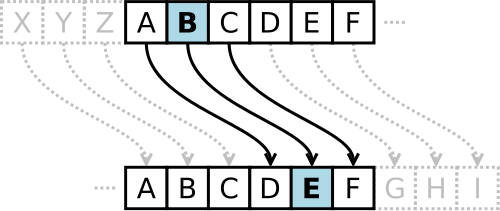
This type of cipher is a special case of the more general substitution cipher. In a substitution cipher, each letter is substituted with a certain other letter. More specifically in the case of the Caesar cipher, we have a secret key that’s known only by those who are supposed to know the information that is shared. This secret key (k) is used to rotate (i.e. shift) each letter by k places. Think of the alphabet as a circle, so that ‘Z’ wraps back around to ‘A’, etc.
For example, suppose that the secret key is k=10 and the plaintext message is Meet me at the Diag at 11 p.m. We would encrypt this message by shifting each letter 10 places:
Meet me at the Diag at 11 p.m.
Wood wo kd dro Nskq kd 11 z.w.
Notice how M became W, since W is 10 characters away from M. Similarly, t became d. t is the 20th letter in the alphabet (and the English alphabet has just 26 letters), so after we get to z (26th letter), we go back to a and go through three more letters to find d.
Some additional notes:
- A negative key would shift the letters back. So if the key were -3,
Ewould becomeBandAwould becomeX. - Because the English alphabet has just 26 letters, keys of -25, 1, 27, 53, etc. are equivalent.
- This cipher will encrypt only uppercase and lowercase letters. This means that only alphabetical characters are shifted. Furthermore, uppercase letters will remain uppercase and lowercase letters will remain lowercase after shifting. All other characters will remain the same.
- Decrypting Caesar cipher is fairly simple: it suffices to shift the letters the other way.
- If you’d like more information and history, check out http://en.wikipedia.org/wiki/Caesar_cipher.
Next, we’ll consider an overview of functions that you must implement in caesar.py. Note that the functions that follow do not print anything on their own; instead they return the result.
shift_alpha_character
def shift_alpha_character(c: str, k: int) -> str
This function requires that the first argument that’s passed in, c, be a letter. So you may assume that it will only be called with an uppercase or a lowercase letter. And remember not to call this function with anything but alphabetical characters, not even in your test suite!
Shifting a character is illustrated by the same diagram you saw earlier. Suppose that you’re working with uppercase characters and n is 3. Then the characters would be shifted like this:
Note that the letter must remain in the same case after you shift it. So if c is lowercase, it will remain lowercase when this function returns it; if c is uppercase, it will remain uppercase.
Below are some examples of how you can test shift_alpha_character in test.py. Since the function itself does not print anything, we have to print its return value:
  print(shift_alpha_character('a', 0))
  print(shift_alpha_character('b', 2))
  print(shift_alpha_character('X', 5))
  print(shift_alpha_character('X', 50))
You should get this output:
a
d
C
V
How can we get from ASCII values to positions in the alphabet? You’ll need to work this out in shift_alpha_character. Review the section on ASCII values if you need a reminder. This is also where you’ll need to handle the wrapping around of letters.
When applied to negative numbers, the modulus operator works differently in Python than in C++. So, as you experiment with this, please note that any friends you may have in a C++ section will be doing something different from you!
caesar_cipher
def caesar_cipher(original: str, key: int, encrypt: bool) -> str
As its name suggests, this function encrypts or decrypts the string that’s passed in using the algorithm described above.
For example, suppose original is the string "Meet me at the Diag at 11 p.m.", key is 42 and encrypt is true. Then calling caesar_cipher and printing its return value in test.py
print(caesar_cipher("Meet me at the Diag at 11 p.m.", 42, True))
would cause the following to be printed:
Cuuj cu qj jxu Tyqw qj 11 f.c.
To decrypt a message, call caesar_cipher with encrypt set to false:
print(caesar_cipher("Cuuj cu qj jxu Tyqw qj 11 f.c.", 42, False))
which would print
Meet me at the Diag at 11 p.m.
Don’t forget to keep writing tests in test.py for functions we declared in caesar.py!
For creating and verifying test cases for your caesarCipher, this website may be helpful.
vigenere.py
Vigenère
Suppose a “bad actor” is trying to intercept your secret messages and they know you’re using the Caesar cipher. There are only 26 meaningfully distinct keys for the Caesar cipher, so they could try a brute-force attack in which they decrypt use each of the 26 possible keys, and then seeing which one results in a sensible message.
Thus, the Caesar cipher is not very secure. An alternative is the Vigenère cipher. It dates to the fifteenth century and is one of the truly great early breakthroughs in the development of cryptography. For more information, check out http://en.wikipedia.org/wiki/Vigenère_cipher.
The Vigenère cipher improves upon Caesar cipher by shifting letters using different keys. This sequence of keys is known as a keyword. Each letter in the keyword represents by how far the corresponding letter in the original message will be shifted (A and a represent 0, B and b represent 1, Z and z represent 25).
For example, suppose you still want to send that same secret message, Meet me at the Diag at 11 p.m. But this time, you’re more careful and are using Vigenère cipher with the key Squirrel!
Here’s how to encrypt:
 plaintext:  Meet me at the Diag at 11 p.m.
       key:  SQUI RR EL SQU IRRE LS    Q U
ciphertext:  Euyb dv ee lxy Lzrk ll 11 f.g.
We first converted each letter of the keyword to uppercase and removed all non-alphabetic characters. We also applied the key just to letters and repeated the keyword after its last letter. Since S is 18 characters away from A, M is shifted by 18.
So putting it all together, you will need to do the following:
- Convert all letters in the keyword to uppercase.
- Remember to strip all non-alphabetic characters from the keyword.
- The keyword can be of any length greater than 0 and repeats after its last character.
- Apply the keyword only to alphabetical characters in the original message.
- As in the Caesar cipher,
Zwraps toAandzwraps toa. - Decrypting would shift the letters backward.
- This cipher will encrypt and decrypt only uppercase and lowercase letters. This means that only alphabetic characters will be shifted. Furthermore, uppercase letters will remain uppercase and lowercase letters will remain lowercase after shifting. All other characters will remain the same.
vigenere_cipher
def vigenere_cipher(original: str, keyword: str, encrypt: bool) -> str
Notice that this function requires that keyword contain at least one alphabetical character. This means that you every time you call this function the string you provide as the second argument needs to have at least one letter in it. Make sure this is true for you function calls when testing the function, as well as anywhere else in your code.
When you implement this function, be sure to follow the rules outlined above.
For example, suppose in test.py you want to encrypt the string "Meet me at the Diag at 11 p.m." with the keyword "Squirrel!". You would call it and print its return value like this:
print(vigenere_cipher("Meet me at the Diag at 11 p.m.", "Squirrel!", True))
Then the following ciphertext should print:
Euyb dv ee lxy Lzrk ll 11 f.g.
Remember that decrypting shifts the letters backward! As an example:
print(vigenere_cipher("Euyb dv ee lxy Lzrk ll 11 f.g.", "Squirrel!", False))
And this is the output:
Meet me at the Diag at 11 p.m.
polybius.py
Polybius Square
While shifting characters based on a key is common in ciphers, another common approach is to construct a grid as a cipher. As the name may suggest, the Polybius Square is a device invented by the Ancient Greek historian and scholar Polybius. Although Polybius did not intend for his device to be used as a cipher, the Polybius Square is said to have been used in the form of the “knock code” to signal messages between cells in prisons by tapping the numbers on pipes or walls.
The original grid consists of the English alphabet and the digits 0 through 9.
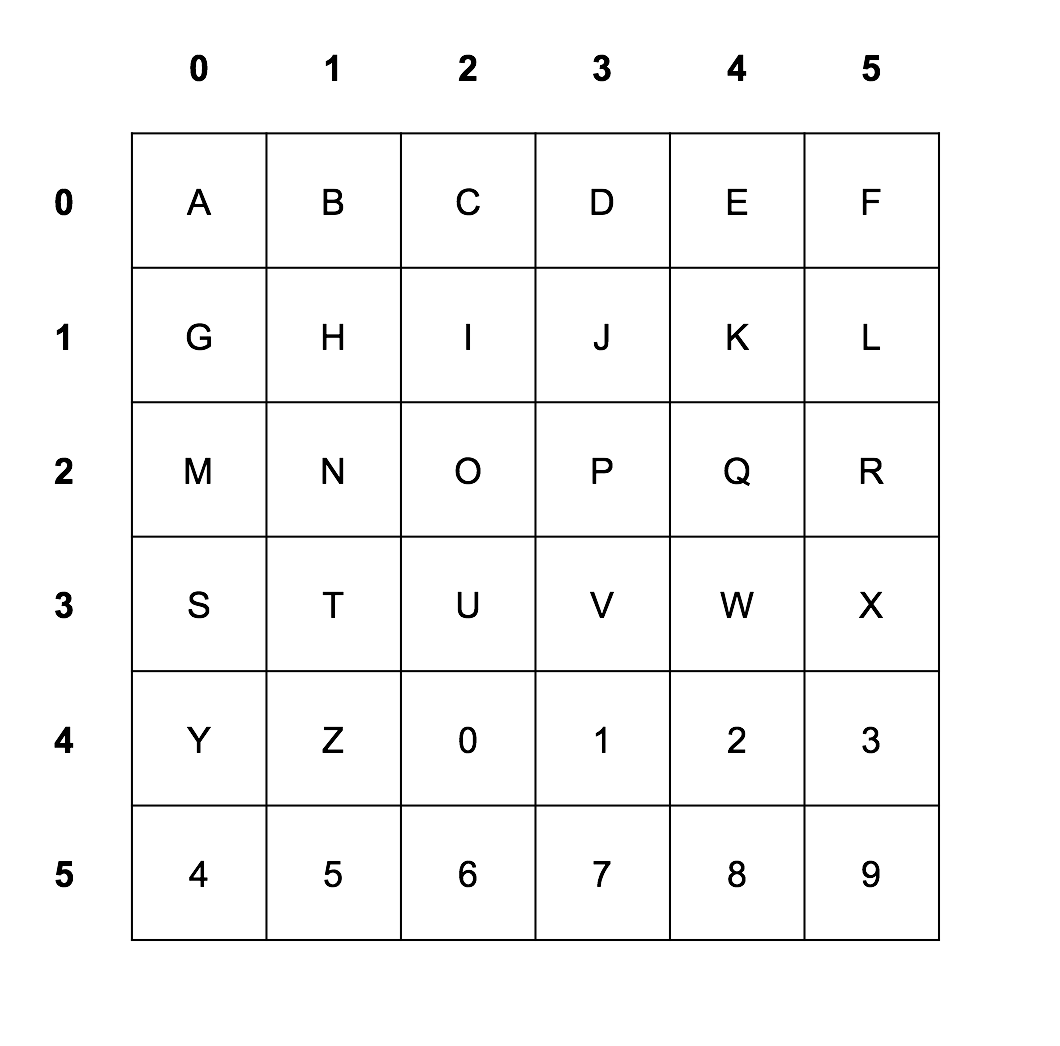
Each letter is then represented by its coordinates in the grid, with the row number first and then the column number. For example, "EECS" becomes "04040230" in the original grid above.
The encryption process using a Polybius Square begins with generating a Mixed Square, using a keyword. Once the Mixed Square is generated, we replace each letter with the “coordinates” of the letter within the grid, reading across first and then down (i.e. row and then column).
As an example, we shall encrypt the plaintext “EECS” with the keyword “POLYBIUS”.
First we make the Mixed Square using the keyword. We start by filling in the squares in the grid with the letters of the keyword, ignoring repetitions, and then continue with the rest of the alphanumerical letters in its original order.
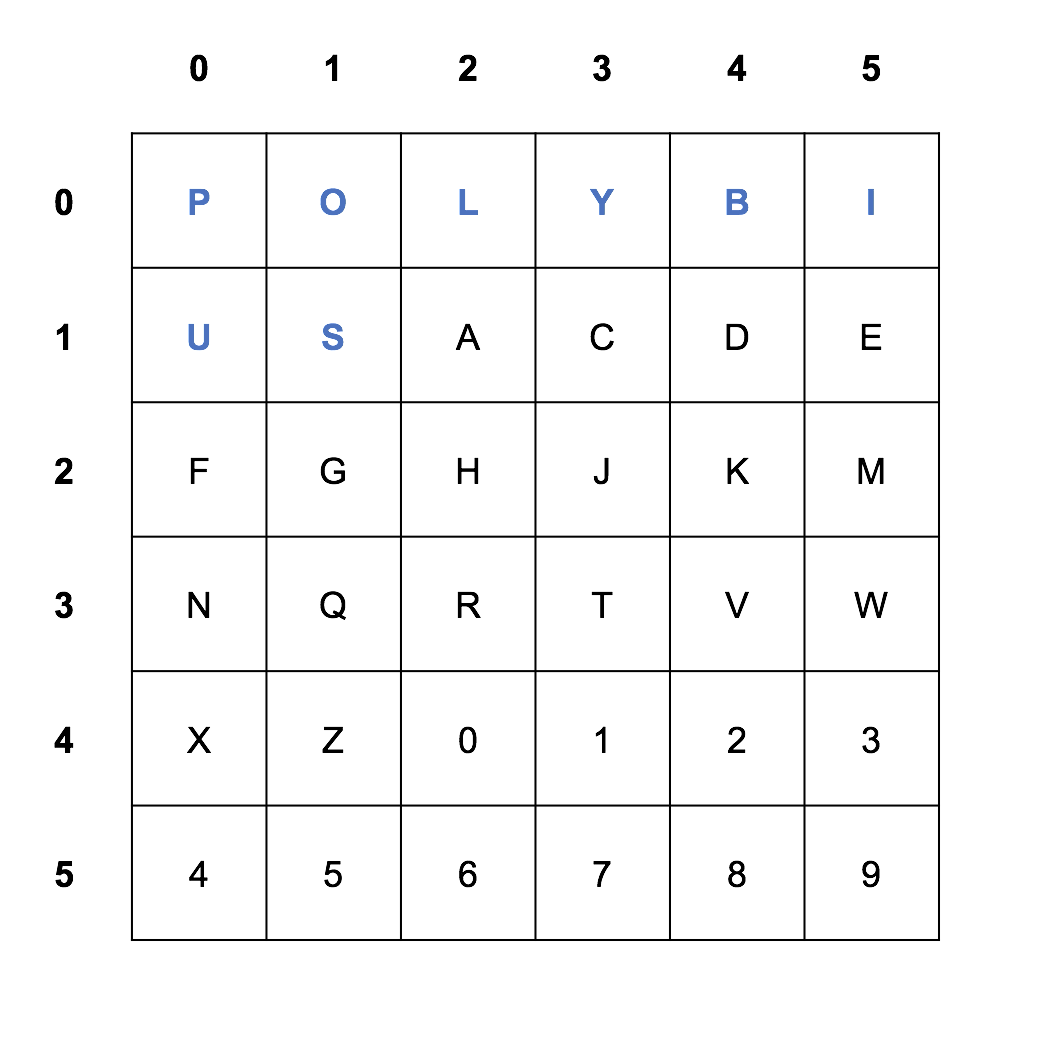
With the Square complete, we simply find each plaintext letter in the grid, and replace it with its coordinates. So “E” becomes “15”, “C” becomes “13”, and “S” becomes “11”. With this, we get the ciphertext “15151311”. Note that each alphanumeric character is always represented by a pair of digits.
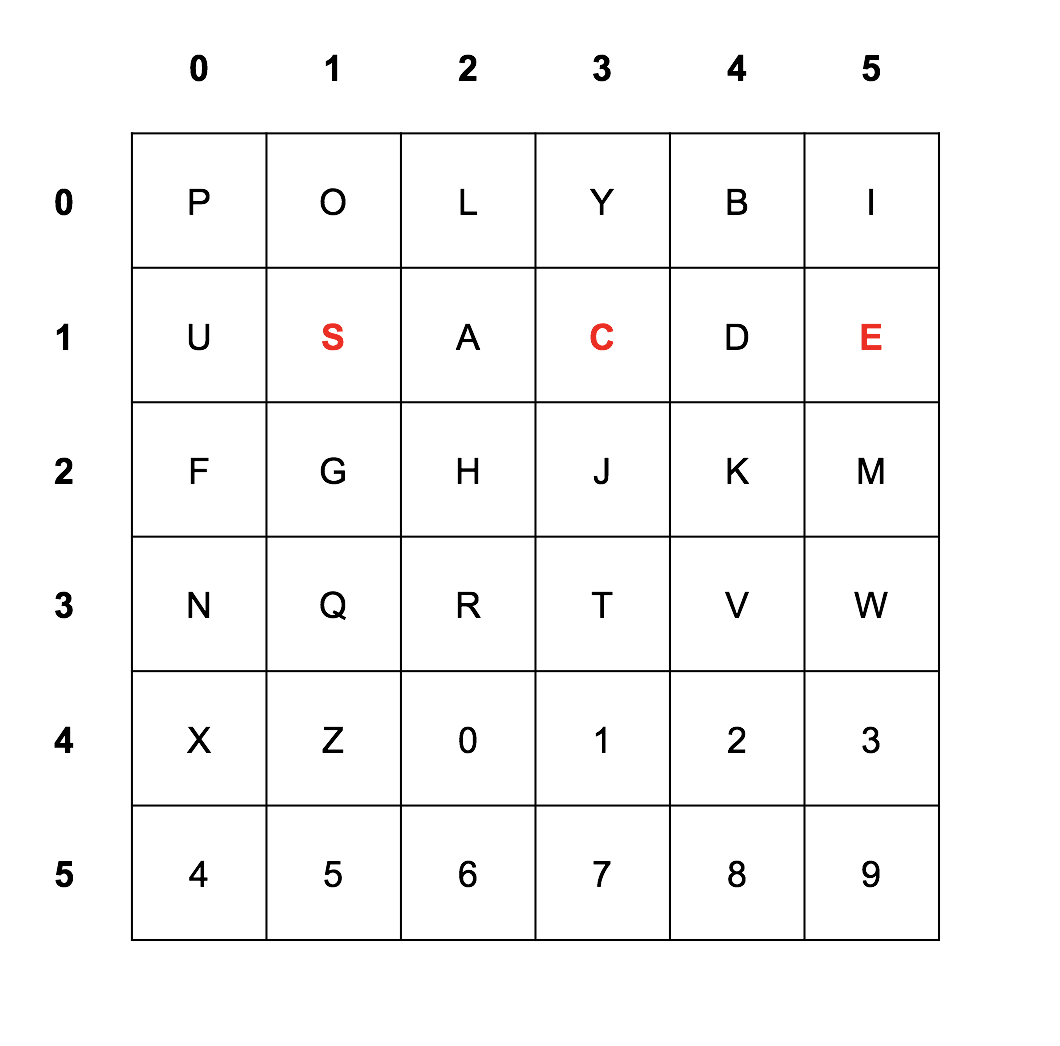
Decryption works in the reverse order, by translating the coordinates to its corresponding letter in the grid.
The Mixed square is generated in exactly the same way as we did before.
Imagine we received the ciphertext “435445” and the key is “POLYBIUS” again. Then “43” becomes “1”, “54” becomes “8”, and “45” becomes “3”. With this, we get the plaintext “183”.
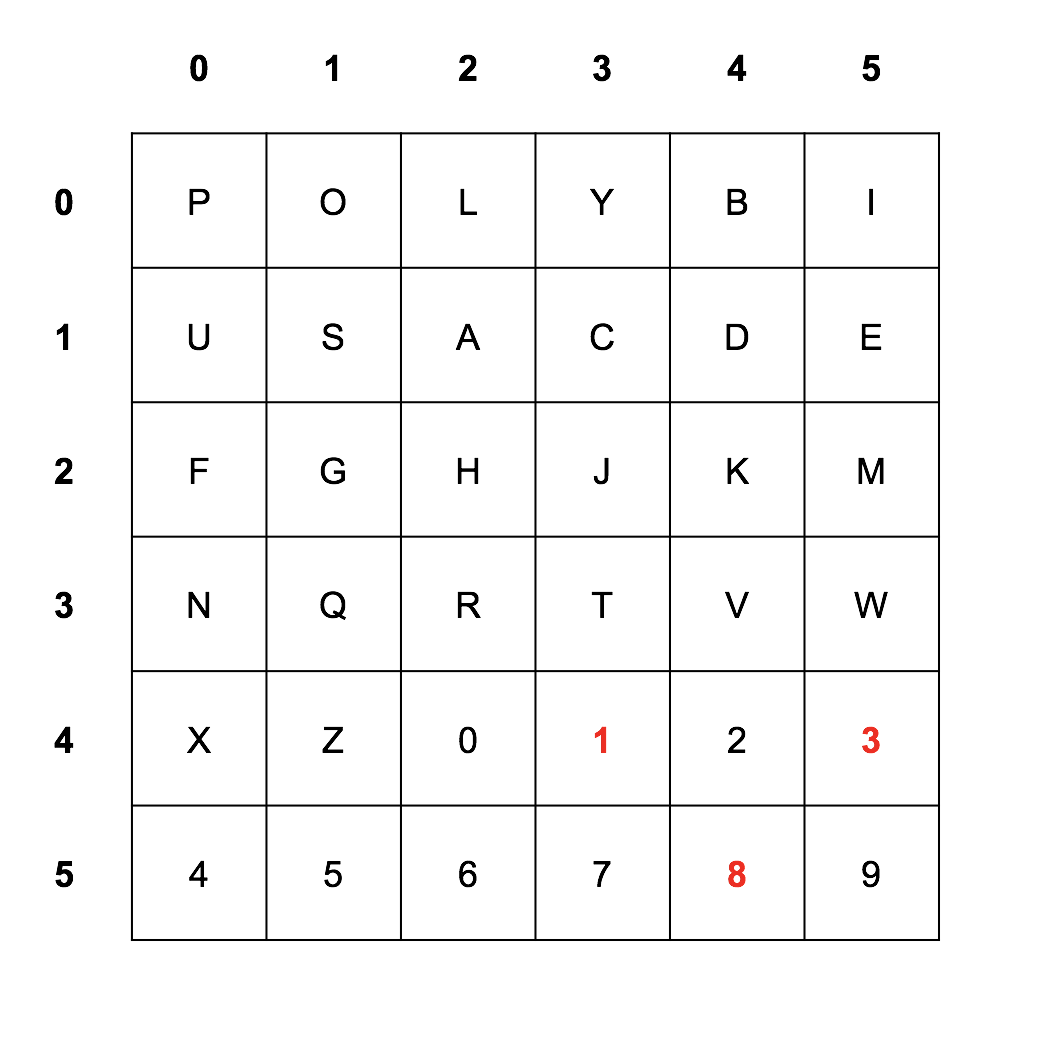
The grid does not represent any non-alphanumerical character. This means that such characters cannot be encrypted. However spaces are allowed in the plaintext, and should be represented as spaces in the ciphertext.
fill_grid
def fill_grid(grid: list, content: str) -> None
Notice that this function requires that content be of length of 36. This means that you should never be passing a string that has a length that does not equal 36.
For example, suppose in test.py you want to fill the grid with the constant string ALNUM defined in utility.py. This can be done as follows:
To test that your grid has been filled correctly, you should call the print_grid function implemented for you in utility.py.
NOTE:
SIZEis a constant inutility.pythat represents the maximum dimension of the grid, which has the value 6.
import utility as ut

def fill_grid_with_alnum():
    # Make a 6x6 grid filled with empty strings
    grid = []
    for i in range(ut.SIZE):
        row = []
        for j in range(ut.SIZE):
            row.append('')
        grid.append(row)

    fill_grid(grid, ut.ALNUM)
    ut.print_grid(grid)


fill_grid_with_alnum()
Even better, we can build the grid and fill it with empty strings using nested list comprehensions. These will be discussed in lecture 12, so don’t worry if you’re reading this before that lecture. But here’s how it would work:
import utility as ut

def fill_grid_with_alnum():
    grid = [['' for _ in range(ut.SIZE)] for _ in range(ut.SIZE)]
    fill_grid(grid, ut.ALNUM)
    ut.print_grid(grid)


fill_grid_with_alnum()
In either case, the output is:
--- --- --- --- --- ---
| A | B | C | D | E | F |
--- --- --- --- --- ---
| G | H | I | J | K | L |
--- --- --- --- --- ---
| M | N | O | P | Q | R |
--- --- --- --- --- ---
| S | T | U | V | W | X |
--- --- --- --- --- ---
| Y | Z | 0 | 1 | 2 | 3 |
--- --- --- --- --- ---
| 4 | 5 | 6 | 7 | 8 | 9 |
--- --- --- --- --- ---
We have implemented print_grid for you, and its RME can be found in utility.py. Feel free to use this helper function when testing other functions in polybius.py.
mix_key
def mix_key(key: str) -> str
Notice that this function requires that key does not contain duplicate characters and consists of only uppercase alphabet and numbers. This means that you do not have to handle duplicate characters or lowercase alphabet. You will later handle duplicate characters and lowercase alphabet in ciphers.py.
For example, suppose in test.py you try to mix the key "POLYBIUS", call it, and print its return value like this:
print(mix_key("POLYBIUS"))
Then the following content should print:
POLYBIUSACDEFGHJKMNQRTVWXZ0123456789
Make use of the constant string ALNUM defined in utility.py. You should always begin with the alphabet and digits in their original order.
find_in_grid
def find_in_grid(c: str, grid: list) -> str
Notice that this function “requires” that c is an uppercase alphabet or a digit. This means that you do not have to handle lowercase alphabet.
For example, suppose in test.py you call find_in_grid with 'A' as c, a grid filled as follows, and printing its return value like this:
grid = [['' for _ in range(ut.SIZE)] for _ in range(ut.SIZE)]
fill_grid(grid, ut.ALNUM)
print(find_in_grid('A', grid))
Then the following content should print:
00
polybius_square
def polybius_square(grid: list, key: str, original: str, encrypt: bool) -> str
Notice that this function “requires” that key does not contain duplicate characters and consists of only uppercase alphabet and numbers. This means that you do not have to handle duplicate characters or lowercase alphabet. You will later handle duplicate characters and lowercase alphabet in ciphers.py.
When you implement this function, be sure to follow the rules outlined above.
For example, suppose in test.py you try to encrypt the string "EECS 183 is the best" with the keyword "183" call it and print its return value like this:
grid = [['' for _ in range(ut.SIZE)] for _ in range(ut.SIZE)]
print(polybius_square(grid, "183", "EECS 183 IS THE BEST", True))
Then the following ciphertext should print:
11110533 000102 1533 341411 04113334
Remember that decrypting uses the same grid as encrypting! As an example:
grid = [['' for _ in range(ut.SIZE)] for _ in range(ut.SIZE)]
print(polybius_square(grid, "183", "11110533 000102 1533 341411 04113334", False))
And this is the output:
EECS 183 IS THE BEST
Note that spaces are allowed in the original message, and they must stay as spaces in the encrypted message as well.
ciphers.py
Sanity check! At this point, utility.py, caesar.py, vigenere.py, and polybius.py should have implementations of all functions that we declared in utility.h, caesar.h, vigenere.h, and polybius.h, and test.py should have a test suite for those functions. If you have not yet submitted, we highly encourage you to do so, unless you are starting late and it is close to the deadline so you have few submissions remaining.
Overview
The autograder tests for ciphers.py test only your ciphers.py file. The autograder tests for ciphers.py will use EECS 183 staff implementations for the other files, like caesar.py. A common problem students encounter in implementing functions in ciphers.py is violating the Requires clause of RMEs for the functions in the other files, like caesar.py, vigenere.py, and polybius.py. If your solution seems to work on your computer, but fails test cases in the autograder for ciphers.py, check very carefully that you are not providing an argument from a function call in ciphers.py that would violate the Requires of the RME for that function.
As your last task involving ciphers, create a program that asks the user for a cipher (Caesar, Vigenere, or Polybius), whether the user would like to encrypt or decrypt a message, asks for the message and then for a key. Finally, the program should print the encrypted or decrypted message, as specified by the user.
At the top of the file, you’ll notice this line that lets ciphers.py use functions that are declared in utility.py, caesar.py, vigenere.py, and polybius.py:
import utility as ut
import caesar
import vigenere
import polybius
after the multiline comment.
Implement the ciphers function in ciphers.py. Let us recommend this structure:
def ciphers():
    # ask user for cipher (Caesar, Vigenere, or Polybius)

    # ask user to encrypt or decrypt

    # get message from user

    # get key or keyword from user

    # encrypt or decrypt message using selected cipher and key(word)

    # print encrypted/decrypted message
When you ask the user for input be sure to use these prompts, followed by a single space, in this order:
-
When encrypting,
Choose a cipher (Caesar, Vigenere, or Polybius): Encrypt or decrypt: Enter a message: What is your key: The encrypted message is: -
When decrypting,
Choose a cipher (Caesar, Vigenere, or Polybius): Encrypt or decrypt: Enter a message: What is your key: The decrypted message is: -
Expect the user to be bad at capitalization and accept input ignoring the case, such as
cAEsar vigenEre POLYBIus ENCRYPT decrypt -
You must also accept
c,v,p,eandd(or uppercase versions) as valid input. If an invalid cipher type or mode (encrypt or decrypt) is entered, you must print out the messageInvalid cipher!orInvalid mode!.
For the Caesar cipher, you may assume the user will always enter a key that is an integer when they have selected to use a Caesar cipher.
-
Then print the encrypted/decrypted message on the same line.
-
Because you’ll probably be repeating some code in
ciphers.py, like prompting the user for a string and reading that string, it’s a good idea to factor out common functionality into separate functions. Define those functions inciphers.py, not inutility.py. Be sure to write RME comments above those functions’ declarations to maximize style points.
Be sure not to modify any of the function headers, since we’ll be using the original version when grading your project.
Error handling in ciphers
This section applies to the ciphers function in ciphers.py. These are not instructions for how to implement each cipher (caesar, vigenere, or polybius). These are instructions for how to handle user input within the ciphers function so that your ciphers.py does not violate the Requires clause of the RMEs for your caesar_cipher, vigenere_cipher, and polybius_square functions.
Your ciphers function must not violate the Requires clause of the RME for any function. Since the user may enter values that may do so, you must catch these and either print an error message, or modify the input values to conform to the Requires clause before calling the corresponding cipher function.
Here are the errors you must handle in ciphers:
-
If the user enters an invalid cipher type (anything other than what is defined above), print
Invalid cipher!, and make the program end (e.g., by callingreturn(without a value afterwards_ within theciphersfunction). -
If the user enters an invalid mode (anything other than what is defined above), print
Invalid mode!, and make the program end. -
For Caesar Cipher, you can assume that the user will always enter an integer-valued key when they have selected to use the Caesar Cipher. You do not need to handle the case where they enter a non-integer key.
-
For Vigenere Cipher, you must ensure that the keyword contains at least one alphabetical character. If not, print
Invalid key!, and make the program end. -
For Polybius Square, you must ensure that the message is valid. That is, you must verify that all characters are alphanumeric or a space. Lowercase letters are valid, but the message must be converted to uppercase before calling the polybiusSquare function. If an invalid message is entered, you must print
Invalid message!, and make the program end. -
For Polybius Square, you must ensure that the key is valid. That is, you must verify that all characters are alphanumeric, all characters are uppercase, and that there are no duplicates. To ensure this, the key must be converted to uppercase, and duplicates must be removed from the key before calling the polybiusSquare function. Non-alphanumeric characters in the key should not be removed, but instead should result in an error message. If an invalid key is entered - containing anything other than alphanumeric characters - you must print
Invalid key!, and make the program end. -
HINT: think of which functions in utility.py you can use to accomplish the above requirements.
Sample Output
When you run ciphers.py, it should behave per the examples below. Assume that the red underlined text is what some user has typed.
NOTE: The following sample runs do not include the menu selection detailed in Creating a Project.
Sample Run 1
Choose a cipher (Caesar, Vigenere, or Polybius): caesar
Encrypt or decrypt: encrypt
Enter a message: I solemnly swear that I am up to no good.
What is your key: 7
The encrypted message is: P zvsltusf zdlhy aoha P ht bw av uv nvvk.
Sample Run 2
Choose a cipher (Caesar, Vigenere, or Polybius): c
Encrypt or decrypt: d
Enter a message: P zvsltusf zdlhy aoha P ht bw av uv nvvk.
What is your key: 7
The decrypted message is: I solemnly swear that I am up to no good.
Sample Run 3
Choose a cipher (Caesar, Vigenere, or Polybius): vigenere
Encrypt or decrypt: decrypt
Enter a message: U lgp'a os qaoxitk iaz ltvcfqq. Teoafoq ckwhtpd riady qh.
What is your key: Mischief managed.
The decrypted message is: I don't go looking for trouble. Trouble usually finds me.
Sample Run 4
Choose a cipher (Caesar, Vigenere, or Polybius): ViGenere
Encrypt or decrypt: DECrypt
Enter a message: U lgp'a os qaoxitk iaz ltvcfqq. Teoafoq ckwhtpd riady qh.
What is your key: Mischief managed.
The decrypted message is: I don't go looking for trouble. Trouble usually finds me.
Sample Run 5
Choose a cipher (Caesar, Vigenere, or Polybius): polybius
Encrypt or decrypt: encrypt
Enter a message: EECS 183 is the best
What is your key: POLYBIUS
The encrypted message is: 15151311 435445 0511 332215 04151133
Sample Run 6
Choose a cipher (Caesar, Vigenere, or Polybius): P
Encrypt or decrypt: E
Enter a message: EECS 183 is the best
What is your key: polybius
The encrypted message is: 15151311 435445 0511 332215 04151133
Sample Run 7
Choose a cipher (Caesar, Vigenere, or Polybius): hello
Invalid cipher!
Sample Run 8
Choose a cipher (Caesar, Vigenere, or Polybius): C
Encrypt or decrypt: V
Invalid mode!
Sample Run 9
Choose a cipher (Caesar, Vigenere, or Polybius): v
Encrypt or decrypt: e
Enter a message: EECS 183 is the best
What is your key: 183
Invalid key!
Sample Run 10
Choose a cipher (Caesar, Vigenere, or Polybius): P
Encrypt or decrypt: enCRYPT
Enter a message: Life isn't about waiting for the storm to pass its about learning to dance in the rain
Invalid message!
Sample Run 11
Choose a cipher (Caesar, Vigenere, or Polybius): PolyBius
Encrypt or decrypt: EnCrypt
Enter a message: The grasshopper lies heavy
What is your key: YEET!!!
Invalid key!
Sample Run 12
Choose a cipher (Caesar, Vigenere, or Polybius): Polybius
Encrypt or decrypt: Encrypt
Enter a message: The grasshopper lies heavy
What is your key: 183EECS
The encrypted message is: 341503 1433100505153031310333 23200305 1503104043
Sample Run 13
Choose a cipher (Caesar, Vigenere, or Polybius): Polybius
Encrypt or decrypt: decrypt
Enter a message: 341503 1433100505153031310333 23200305 1503104043
What is your key: 183EECS
The decrypted message is: THE GRASSHOPPER LIES HEAVY
Sample Run 14
Choose a cipher (Caesar, Vigenere, or Polybius): Caesar
Encrypt or decrypt: encrypt
Enter a message: Do androids dream of electric sheep?
What is your key: 9000
The encrypted message is: Hs erhvsmhw hvieq sj ipigxvmg wliit?
- Now you can send secret messages to your friends. (Although they’ll need the same program to decrypt your messages!)
Note that when selecting Polybius Square, the decrypted message is all uppercase, while the original message contained lower case letters. This is fine, as the grid we construct only supports uppercase letters.
Function Table
- The table below provides an outline of which other functions you’ve written that each function should call, if any.
| File | Function | Other functions it should call |
|---|---|---|
utility.py |
remove_non_alphas() |
Does not utilize any other functions |
utility.py |
remove_duplicate() |
Does not utilize any other functions |
caesar.py |
shift_alpha_character() |
Does not utilize any other functions |
caesar.py |
caesar_cipher() |
shift_alpha_character() |
vigenere.py |
vigenere_cipher() |
remove_non_alphas(), shift_alpha_character() |
polybius.py |
mix_key() |
Does not utilize any other functions |
polybius.py |
fill_grid() |
Does not utilize any other functions |
polybius.py |
find_in_grid() |
Does not utilize any other functions |
polybius.py |
polybius_square() |
mix_key(), fill_grid(), find_in_grid() |
Here is an example of how to read the table:
caesar_cipher()should callshift_alpha_character()
Note that the functions under “Other functions it should call” only refer to the functions you will implement. Feel free to use library functions anywhere (e.g., ord, isalpha, etc.).
Style Checklist
Review EECS 183 Python Style Guide and the Project 3 Style Rubric below. All sections are relevant to this project. A non-exhaustive list of reminders follows:
-
Be sure that your code is well-commented. It might at first seem that the algorithm is straight-forward and self-explanatory, but would you remember all the details a month from now? It’s also much easier for the staff to help you with your code if you have comments!
-
Do not compare boolean values to
trueorfalsein a conditional expression. -
Make sure that you’re not redundantly repeating code. If you have large blocks of code that appear in several places, it might make sense to create a helper function. And certainly utilize functions such as
shift_alpha_characterinside others. -
Don’t use
breakorcontinuein loops. Loops should be controlled by a condition and should terminate when that condition is met. -
Remember to avoid magic numbers. Be sure that you don’t have numbers like 26, 32, 65 or 97 in your code!
-
Don’t use global variables.
-
Remember that all lines must be 80 characters or less.
NOTE: We will not be grading style in
test.py.
Style Rubric
Specific deductions are outlined below.
Readability Violations
-1 for each of the following categories:
- Top comment problems.
- Missing RME for any function.
- Other comment problems.
- Indentation problems.
- Whitespace problems.
- Variable problems.
- Line length problems.
- Boolean Expression problems.
Coding Quality Violations
-2 for each of the following categories:
- Global constants not following naming conventions, or global variables used.
- Magic numbers used.
- Using the ASCII int value instead of the character. For example using
65instead oford('A'). - Using logic that is clearly too involved or incorrect.
- For example, instead of using isnumeric(), checking each digit individually, like
if s[i] == '0' or s[i] == '1' or s[i] == '2' or ...
- For example, instead of using isnumeric(), checking each digit individually, like
- Not calling helper functions where appropriate. Examples include, but are not limited to:
- Not calling
remove_non_alphasfor the Vigenère cipher - Not calling
remove_duplicatefor the key for the Polybius Square - Not calling
char_to_intinsidepolybius_squareinpolybius.py
- Not calling
- Having tester functions remaining in your submission for the regular project (of course, does not apply to
test.py). - Using
breakorcontinuestatements in a loop.
How to Submit
- Go to the autograder, where you will submit these files:
- caesar.py
- utility.py
- test.py
- ciphers.py
- polybius.py
- vigenere.py
IMPORTANT:
- Differences in whitespace of your output can fail the autograder.
- Be sure to submit all parts of the project.
- Ensure that you have included your (and your partner’s) name, your (and your partner’s) uniqname and a small description of the program in the header comments in all files submitted.
- You have four submissions to the autograder per day with feedback, and one additional “wildcard” submission to use once during the project.
- We will grade your best submission for style. If multiple submissions are tied in score, we take the last of those.
Copyright and Academic Integrity
© 2026 Bill Arthur and Steven Bogaerts.
This work is licensed under a Creative Commons Attribution-NonCommercial-ShareAlike 4.0 International License.

All materials provided for this course, including but not limited to labs, projects, notes, and starter code, are the copyrighted intellectual property of the author(s) listed in the copyright notice above. While these materials are licensed for public non-commercial use, this license does not grant you permission to post or republish your solutions to these assignments.
It is strictly prohibited to post, share, or otherwise distribute solution code (in part or in full) in any manner or on any platform, public or private, where it may be accessed by anyone other than the course staff. This includes, but is not limited to:
- Public-facing websites (like a personal blog or public GitHub repo).
- Solution-sharing websites (like Chegg or Course Hero).
- Private collections, archives, or repositories (such as student group “test banks,” club wikis, or shared Google Drives).
- Group messaging platforms (like Discord or Slack).
To do so is a violation of the university’s academic integrity policy and will be treated as such.
Asking questions by posting small code snippets to our private course discussion forum is not a violation of this policy.